

Real-World Production Roadblocks
As an AI architect, I’ve seen countless developers fall into the “tutorial trap” of using sequential loops for database inserts. It works locally but crashes in production. Moving to execute_values and batching API requests isn’t just a best practice—it’s the only way to survive migrating tens of thousands of vector embeddings without pipeline timeouts.
-
The Silent Driver Crash:
Passing Python lists to psycopg2 without the explicit
%s::vectorcast causes serialization failures. PostgreSQL will not recognize the value as a vector array. -
The “Premature Index” Disaster:
Creating an
ivfflatindex before a massive bulk insert forces PostgreSQL to estimate cluster boundaries using an empty table. Always bulk insert first, then create the vector index for better recall. -
Memory Exhaustion:
Building an
HNSWindex dynamically during ingestion can overwhelmshared_buffersand stall the database. Batch ingestion improves disk I/O efficiency, while proper index timing protects memory usage.
1. Why Vector Search in Postgres is Crucial for Modern AI
In the old days of data engineering, search was rigid. We relied on SQL LIKE '%laptop%' or exact full-text matches. If a user searched for a “portable coding machine,” a traditional relational database would return zero results because the exact keywords didn’t match.
In the new era of technology, AI changes everything through semantic similarity.
Real-Practical Scenario
- Convert your product catalog into 1536-dimensional arrays using OpenAI’s
text-embedding-3-small. - This allows the database to understand semantic similarity — for example, it recognizes that “MacBook” and “portable coding machine” occupy the same conceptual space.
The Problem
- Moving tens of thousands of embeddings from an API into Postgres overwhelms traditional
forloops. - Without optimization, inserts become painfully slow and unsuitable for production workloads.
- The solution is high-throughput batching, which ensures scalability and speed in real-world AI pipelines.
2. The Code: A Production-Ready Python Batch Insert Pipeline
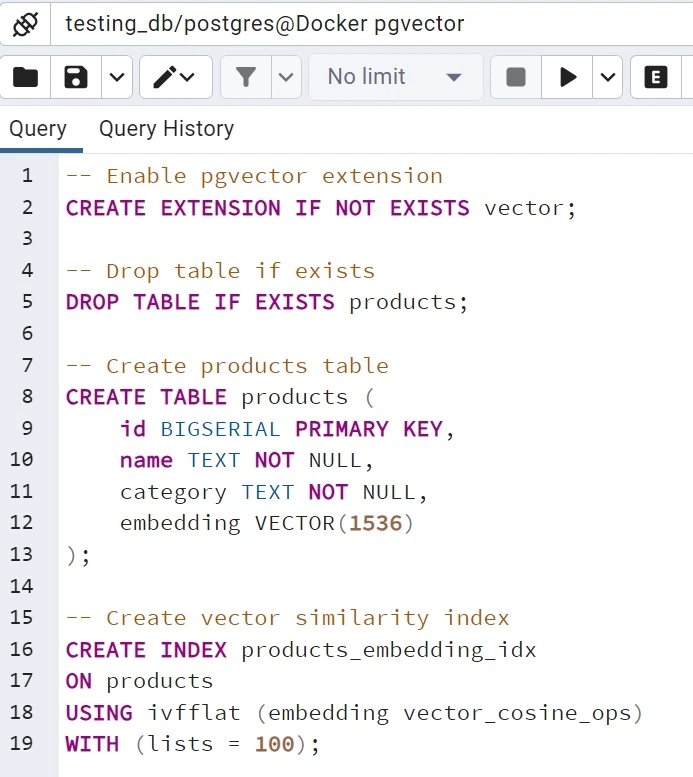
“The above image contains my code for a complete pgvector SQL query used in embedding vector search.”
Here is the exact Python architecture used by senior developers to ingest thousands of vectors in seconds, bypassing standard network latency.
Let’s clearly understand step by step process from creating a proper table in pgvector + dockor in postgreSQL
1. Enable pgvector Extension
CREATE EXTENSION IF NOT EXISTS vector;pgvector extension in PostgreSQL.2. Drop Table if Exists
DROP TABLE IF EXISTS products;products table if it already exists.3. Create Products Table
CREATE TABLE products (
    id BIGSERIAL PRIMARY KEY,
    name TEXT NOT NULL,
    category TEXT NOT NULL,
    embedding VECTOR(1536)
);
-
BIGSERIAL PRIMARY KEY: Auto-incrementing unique identifier. -
TEXT NOT NULL: Ensures product name and category are always present. -
VECTOR(1536): Column type for storing embeddings generated bytext-embedding-3-small.
4. Create Vector Similarity Index
CREATE INDEX products_embedding_idx
ON products
USING ivfflat (embedding vector_cosine_ops)
WITH (lists = 100);
ivfflat index to accelerate vector similarity search.-
USING ivfflat: Specifies the indexing method optimized for approximate nearest neighbor queries. -
vector_cosine_ops: Defines cosine similarity as the distance metric. -
WITH (lists = 100): Controls clustering granularity; higher values can improve recall but may increase memory usage.
Complete python code
“The first and most important step is to securely save your database connection string and OpenAI API key in a .env file. Create a .env file and add your pgvector database credentials and OpenAI API key.”
OPENAI_API_KEY=sk-proj-saFYat4BET1lRbiXT5Rrj6Rk7W41v_8JmUe18Ris-2fm8yTvRTgr********************FJNsVt6n64H69M2UZObSlkVI_2EQWSXUhB3ilWYCFQyGA6xBEiTH4-gmuXb0c_NDIp2RT1eNE_8A

DATABASE_URL=postgresql://postgres:YOURPASSWORD@localhost:5433/testing_db
next, create one python file in my case insert_record.py
import os
from dotenv import load_dotenv
import psycopg2
from psycopg2.extras import execute_values
from openai import OpenAI

load_dotenv(override=True)

client = OpenAI(api_key=os.getenv("OPENAI_API_KEY"))
conn = psycopg2.connect(os.getenv("DATABASE_URL"))
cur = conn.cursor()

cur.execute("CREATE EXTENSION IF NOT EXISTS vector")
cur.execute("DROP TABLE IF EXISTS products")

cur.execute("""
CREATE TABLE products (
    id SERIAL PRIMARY KEY,
    name TEXT NOT NULL,
    category TEXT NOT NULL,
    embedding VECTOR(1536)
)
""")

cur.execute("""
CREATE INDEX products_embedding_idx
ON products
USING ivfflat (embedding vector_cosine_ops)
WITH (lists = 100)
""")
conn.commit()

products = [
    ("iPhone 15", "Smartphone"),
    ("MacBook Air M3", "Laptop"),
    ("Sony WH-1000XM5", "Headphones"),
    ("Dell XPS 13", "Laptop")
]

texts = [f"{name} {category}" for name, category in products]

response = client.embeddings.create(
    model="text-embedding-3-small",
    input=texts
)

data_payload = []
for (name, category), item in zip(products, response.data):
    data_payload.append((name, category, item.embedding))

execute_values(
    cur,
    """
    INSERT INTO products (name, category, embedding)
    VALUES %s
    """,
    data_payload,
    template="(%s, %s, %s::vector)" # Crucial explicit type cast
)

conn.commit()
cur.close()
conn.close()

print("Batch processing completed successfully!")
3. Key Optimizations: execute_values and VECTOR(1536)
texts array to the OpenAI API in a single HTTP request instead of making multiple sequential requests.execute_values Function: This compiles all records into one large SQL statement, allowing PostgreSQL to write to the Write-Ahead Log (WAL) only once for improved bulk insert performance.4. Security First: Protecting Your OpenAI API Keys
.env files: Store sensitive variables such as
OPENAI_API_KEY and
DATABASE_URL in a dedicated environment file instead of embedding them directly into source code..gitignore: Always include your
.env file in
.gitignore to prevent sensitive credentials from being uploaded to GitHub or other remote repositories.5. Beginner Mistakes: Avoid Slow Loops in pgvector
for loops. At production scale, this approach becomes extremely slow and can cause applications to stall for hours when processing large datasets.ivfflat too early: Creating the vector index before bulk inserting data can reduce clustering quality and negatively impact similarity search performance. Always load the dataset first, then create the index afterward.VACUUM ANALYZE: After large batch inserts, PostgreSQL statistics may become outdated, causing inefficient query planning. Running
VACUUM ANALYZE table_name; refreshes statistics and helps maintain fast search performance.6. Common pgvector Errors and How to Fix Your ivfflat Index
psycopg2.ProgrammingError: can't adapt type 'list'(%s, %s, %s::vector) so PostgreSQL correctly interprets the Python float array as a native vector type.column cannot have more than X dimensionstext-embedding-3-small, your column must be explicitly defined as
VECTOR(1536).ivfflat clusters may be poorly configured. Drop and recreate the index, then tune the
lists parameter appropriately. A common guideline is to set it close to the square root of the total row count.7. Conclusion: Scaling Your RAG Pipelines
Scaling your AI search engine doesn't require buying into expensive, closed-source vector databases. By optimizing how Python communicates with Postgres—specifically through batched API calls and the execute_values function—you can ingest millions of high-dimensional vectors rapidly and reliably.
8. Frequently Asked Questions on Postgres Vector Storage
Why use ivfflat instead of HNSW?
ivfflat is faster to build and uses less RAM than HNSW. It is a practical choice for most developer projects, static datasets, and lower-memory servers. HNSW may improve recall slightly, but it requires more memory and longer indexing times.
How many dimensions does text-embedding-3-small use?
OpenAI’s text-embedding-3-small model outputs 1536-dimensional embeddings. Your PostgreSQL column must be defined as VECTOR(1536) to match the model output.
How do I speed up vector inserts in Python?
Do not insert vectors one row at a time with for loops. Batch your records and use psycopg2.extras.execute_values to send all rows in a single transaction. This is significantly faster and more scalable for production workloads.