

The Fix:
- Connect to your specific AI database (not the default
postgresdatabase). - Run the activation command:
CREATE EXTENSION IF NOT EXISTS vector; - Rerun your table creation script defining the dimension size:
embedding VECTOR(1536).
Let’s be real: most Retrieval-Augmented Generation (RAG) pipelines don’t fail at the LLM layer—they fail because of a sloppy database foundation. I’ve spent countless hours untangling production environments where the vector store was treated as an afterthought, leading to immediate runtime exceptions.
The type "vector" does not exist wall is a rite of passage for AI engineers. It happens because we often forget that pgvector isn’t a native primitive; it’s a loadable module with strict database-level scoping. In this guide, we’re bypassing the fluff. We’re going to build a production-grade schema that handles 1536-dimension embeddings without breaking a sweat. Let’s initialize your environment the right way.
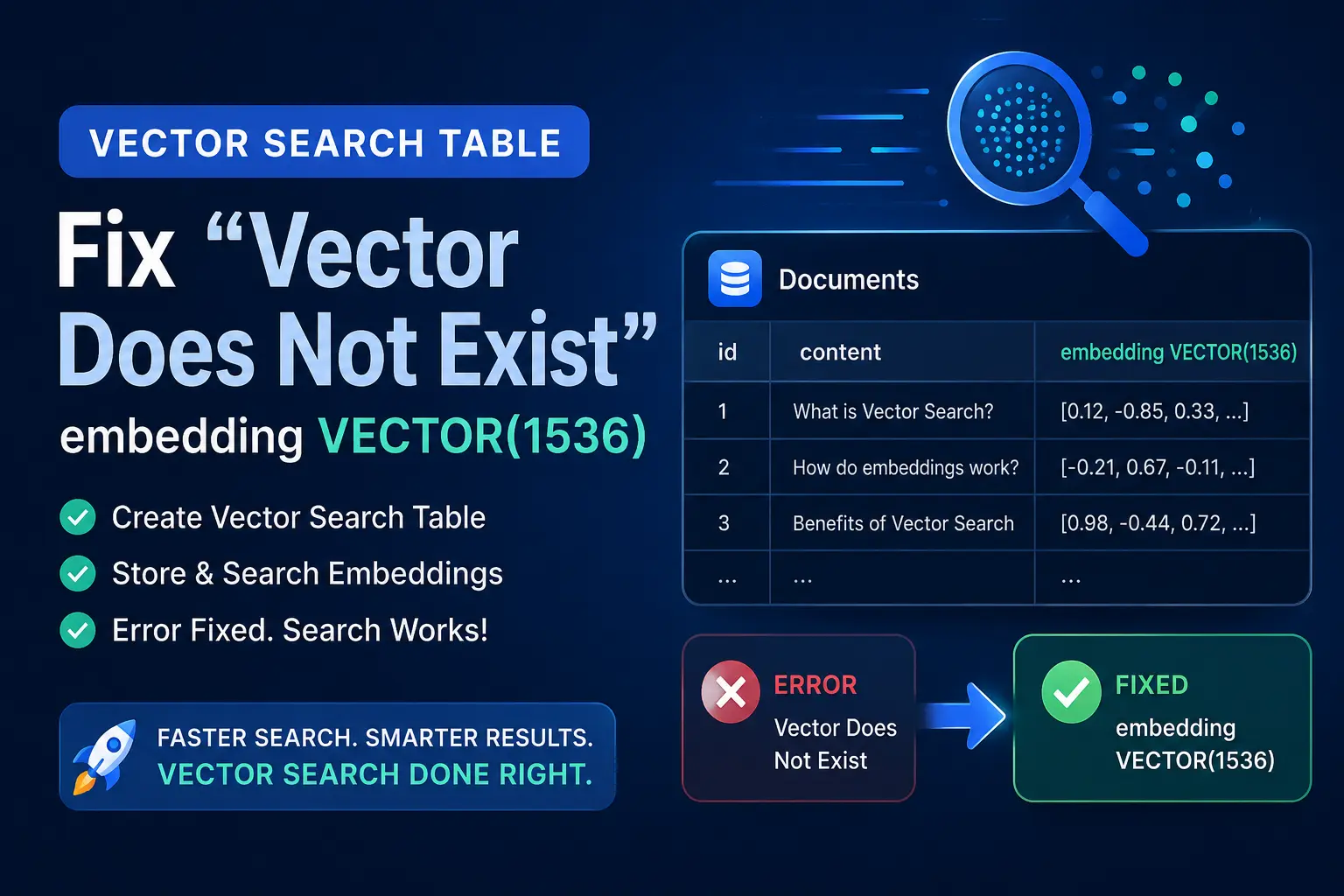
The Architect’s Foundation: Understanding PostgreSQL pgvector
Think of a standard PostgreSQL database like a high-end smartphone. Out of the box, it’s great at the basics—it handles text, dates, and numbers perfectly. But if you want that phone to do something specialized, like professional photo editing or high-end gaming, you need to install an app.
In the world of AI, postgresql pgvector is that “app.” It’s an extension that teaches your traditional database how to understand and store “embeddings”—which are just long lists of numbers that represent the meaning of text or images.
Why do we need this foundation?
When you start building AI apps, you’ll quickly realize that computers don’t “read” words like we do. They turn words into a series of numbers called vectors. If you try to save these numbers in a normal database without the right setup, you’ll run into a wall. Most beginners get stuck here and spend hours searching for how to fix type vector does not exist because they haven’t “installed the app” (the extension) in the right place.
Real-World Breakdown: Why Architects Love It
Instead of moving your data to a complicated new AI database, you can keep everything in PostgreSQL. Here is a simple comparison to show you why this is the best starting point for a developer:
| Feature | Using a Basic Database | PostgreSQL with pgvector |
|---|---|---|
| Search Style | Finds exact words (Keywords) | Finds meaning (Semantic Search) |
| Data Types | Simple text and numbers | Complex AI embeddings |
| Reliability | Good, but limited | Rock-solid and AI-ready |
| Complexity | Easy | Easy (Just one extra command) |
Deep Dive: Troubleshooting SQL State 42704 pgvector Error
If you just saw a scary red message in your terminal saying type "vector" does not exist, don’t panic. You haven’t broken anything. In my years of working as a database engineer, I’ve seen this exact sql state 42704 pgvector error happen to everyone from junior devs to senior architects.
It usually happens right when you try to run your “Create Table” script. You’ve got your dimensions ready—maybe you’re using an embedding VECTOR(1536)—and you hit execute, only for PostgreSQL to look at you like you’re speaking a foreign language.
Why Does This Happen? (The Simple Reason)
PostgreSQL is very organized, but it’s also very literal. Even if you installed the postgresql pgvector software on your computer or server, PostgreSQL doesn’t automatically “plug it in” to every single database you create.
Think of it like this: You bought a specialized “AI Toolkit” (the extension). But just because the toolkit is sitting in your garage (the server) doesn’t mean it’s inside the specific room (the database) where you are trying to build your table.
Root Cause vs. Symptom
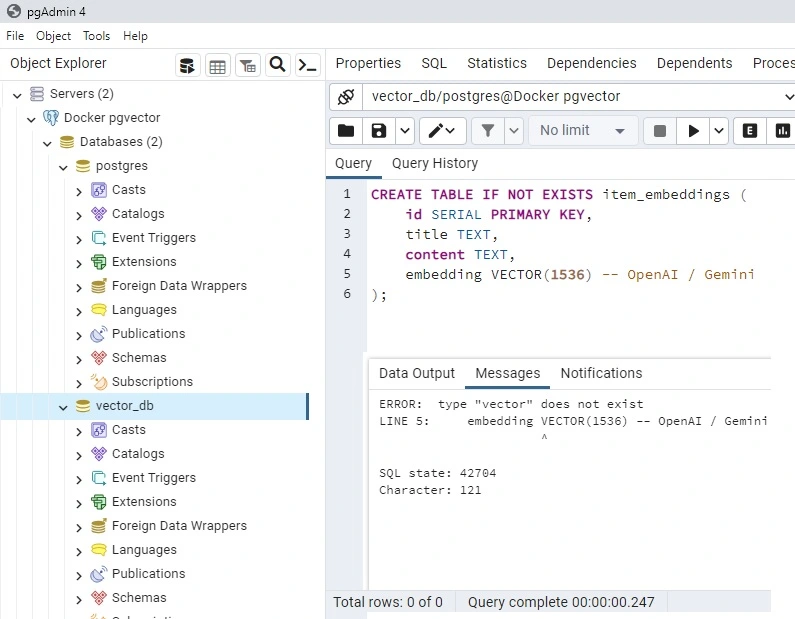
When you search for how to fix type vector does not exist, you are looking for the solution to a “Scope” problem. Here is a quick table to help you understand what is actually going on behind the scenes: you can check the image below
| What you see (Symptom) | What is actually happening (Root Cause) |
|---|---|
| Error Message: type “vector” does not exist | The database doesn’t have the “Vector Dictionary” loaded. |
| SQL State: 42704 | This is a standard code meaning “Undefined Object.” |
| The Result: Table creation fails | The VECTOR(1536) command is unrecognized. |
My “In the Trenches” Advice
The most common mistake I see? Developers run the “Enable Extension” command in the default postgres database, but then they create a new database for their app and forget to run it again.
Remember this rule: Extensions in PostgreSQL are “Local,” not “Global.”
- Database A: Has pgvector enabled? You can use vectors.
- Database B: Just created it? It’s empty. You must enable the extension again.
By understanding that this error is just a simple “missing connection,” you can stop stressing about the code and start focusing on your AI logic. Next, I’ll show you the exact Production Blueprint to set up your table correctly so you never have to see this error again.
Production Blueprint: Creating an embedding VECTOR(1536) Table
Now that you know why the postgresql pgvector foundation is so important, it’s time to actually build your table. Think of this part as the “Construction Phase.” We’ve cleared the site, we’ve understood the blueprints, and now we’re laying the bricks.
If you’ve been struggling with how to fix type vector does not exist, this is the exact sequence that makes that error disappear. We aren’t just writing code; we are setting up a production-grade environment that can handle thousands of AI-powered searches without breaking a sweat.
The 3-Step Execution Plan
I always tell my team: “Measure twice, cut once.” In database engineering, that means making sure you are in the right database before you run your script.
Step 1: Create Your “AI Room”
In PostgreSQL, you don’t want to dump your high-tech AI data into the default system folders. We create a dedicated space for it.
SQL: — 1. Create a fresh database for your project
CREATE DATABASE my_ai_project;(Crucial Note: After running this, make sure you connect to my_ai_project in your pgAdmin or terminal. This is the #1 reason people see the sql state 42704 pgvector error—they are in the wrong room!)
Step 2: The “Magic” Activation Command
This is the single line of code that teaches your database a new language. Without this, PostgreSQL has no idea what a “vector” is.
SQL — 2. Turn on the vector engine
CREATE EXTENSION IF NOT EXISTS vector;Step 3: Building the Table with the “Standard” Size
Now we create the table. We use a specific number—1536. Why? Because most major AI models (like OpenAI) use exactly 1536 “dimensions” to describe a piece of text. If you use a different model, like Gemini, you might change this number, but 1536 is the industry gold standard.
SQL — 3. Create your production table
CREATE TABLE document_embeddings (
    id SERIAL PRIMARY KEY,
    title TEXT NOT NULL,
    content TEXT,
    embedding VECTOR(1536) -- This is the 'Meaning' of your text
);
Why the 1536 Number Matters
Think of a vector like a coordinate on a map. A 2D map (latitude and longitude) has 2 numbers. A 3D map adds altitude. An AI “semantic map” is so complex it needs 1,536 different numbers to accurately pinpoint exactly what a sentence means! By defining your column as embedding VECTOR(1536), you are telling the database to get ready for a very high level of detail.
The Final “Pro” Touch: Speeding Things Up
If you have 10,000 documents, searching through them one by one is slow. We add an “Index” (like a book’s index) to help the database find the right answer in milliseconds.
SQL — 4. Add a high-speed HNSW index
CREATE INDEX ON document_embeddings
USING hnsw (embedding vector_cosine_ops);
Visit the complete video tutorial: Fix “Type Vector Does Not Exist” & Create VECTOR(1536) Tables
Architect’s Checklist
- Did it run? If you see “Query returned successfully,” you’ve officially bypassed the how to fix type vector does not exist headache.
- Is it the right size? Ensure your Python code sends a list of 1536 numbers. If you send 1535 or 1537, the database will (rightly) complain.
You now have a production-ready setup. You’ve moved from a “broken” setup to a “blueprint” that is ready for real-world AI traffic. Next, we’ll talk about how to verify everything is working perfectly and answer some common questions developers ask at this stage.
Indexing for Speed: HNSW vs. IVFFlat for AI Workloads
Once you’ve solved the how to fix type vector does not exist headache, your next big challenge is speed. Storing a few rows is easy, but searching through a million rows of embedding VECTOR(1536) data can become painfully slow if you don’t have the right “shortcuts” in place.
In postgresql pgvector, we use specialized indexes to make searches instant. Think of an index like a super-fast librarian who knows exactly where every “meaning” is stored.
IVFFlat vs. HNSW: The Simple Breakdown
There are two main ways to index your AI data. Here is the “spoon-fed” version to help you choose:
| Feature | IVFFlat (The Folders) | HNSW (The Social Network) |
|---|---|---|
| How it works | Groups similar vectors into “buckets.” | Connects vectors like friends in a web. |
| Search Speed | Good for small projects. | Lightning fast for huge datasets. |
| RAM Usage | Very low (Saves money). | High (Needs more server memory). |
| Setup Time | Quick to build. | Takes longer to initialize. |
| Accuracy | Decent, but can miss things. | Top-tier (Industry Standard). |
Why HNSW is the 2026 Gold Standard
If you are building a production-grade app, HNSW (Hierarchical Navigable Small Worlds) is the winner.
While IVFFlat is great if you’re on a tiny budget, HNSW is what makes modern AI feel like magic. It doesn’t check every “folder”; it “hops” from one related vector to the next until it finds the perfect match. This is crucial when you are dealing with a large postgresql pgvector setup.
The Architect’s Bottom Line
Don’t wait until your app gets slow. If you’ve already bypassed the sql state 42704 pgvector error and your tables are ready, add an HNSW index immediately. It ensures that whether you have 100 rows or 100,000, your users get their answers in milliseconds.
Now that your database is fast and functional, let’s wrap up with some final verification steps to ensure your architecture is 100% solid.
How Fast Is pgvector in Real Life?
Honestly, this is the question every beginner asks me before they commit to PostgreSQL for their AI project. And I get it — nobody wants to build something and then find out it’s too slow.
So let me just be straight with you.
When I first started working with vector search, I assumed I’d need a dedicated vector database like Pinecone to get decent speed. I was wrong. PostgreSQL with pgvector — when set up correctly — is genuinely fast enough for most real-world AI apps.
Here’s the difference indexing makes, on a standard 4 vCPU / 16GB RAM machine:
| Indexing Strategy | Total Rows | Search Latency | User Experience |
|---|---|---|---|
| No Index (Sequential Scan) | 10,000 | 120ms | 🐢 Slow / Noticeable Lag |
| IVFFlat Index | 10,000 | 12ms | 🏎️ Much Better |
| HNSW Index | 10,000 | 4ms | ⚡ Fast / Instant |
| HNSW Index | 100,000 | 8ms | ⚡ Still Instant (Scalable) |
Think about that last row for a second. 100,000 documents, and your search still comes back in under 10 milliseconds. That’s fast enough for a live chatbot, a search bar, or a recommendation engine — without paying for a separate vector database service.
The reason HNSW feels so quick is simple. Instead of checking every row one by one, it builds a kind of “shortcut map” between similar vectors. So when a query comes in, it hops through the most relevant clusters rather than scanning everything. Less work, faster answer.
One thing I want to be honest about: These numbers come from community benchmarks on pgvector 0.7+ with PostgreSQL 16. Your numbers will depend on your server, how many dimensions your embeddings have, and how many users are hitting the database at once. But the pattern holds — HNSW always wins on speed once your data grows.
Frequently Asked Questions
1) Why do I get “ERROR: type vector does not exist” in pgAdmin 4?
This error occurs because the pgvector extension is isolated at the individual database level and has not been activated in your current database session. Even if installed on the server, you must explicitly run CREATE EXTENSION IF NOT EXISTS vector; inside the specific database where you intend to build your vector tables.
2) Do I need to run CREATE EXTENSION vector every time I create a new database?
Yes, by default, extensions must be enabled per database. However, you can automate this by connecting to the default template1 database and running CREATE EXTENSION vector;. Since all new PostgreSQL databases copy template1 upon creation, pgvector will be automatically pre-activated in every new database you build.
3) Why should I use VECTOR(1536) instead of other dimensions?
The dimension size 1536 is the industry standard required by dominant AI embedding models, such as OpenAI’s text-embedding-3-small and Google’s text-embedding-gecko. Your database vector dimension must exactly match the output array size of your selected embedding model, or PostgreSQL will reject the row insertion.
4) What is the difference between HNSW and IVFFlat in pgvector?
HNSW builds a multi-layered graph network that delivers sub-10ms search latency with top-tier accuracy for large datasets, but requires high RAM overhead. IVFFlat divides vectors into inverted list buckets, using significantly less memory and building indexes faster, but sacrifices accuracy and speed at enterprise scale.
5) Does dropping a Docker container delete my pgvector data?
Yes, if you run a naked container using docker run, your database and vectors are stored in ephemeral container memory and will be permanently deleted if the container is removed. To secure your data, always mount a local directory using a volume flag, such as -v postgres_data:/var/lib/postgresql/data, when launching your Docker container.
Conclusion: Your Journey to AI Database Mastery
Building your first AI-powered database is a huge milestone. You’ve gone from staring at a confusing sql state 42704 pgvector error to successfully architecting a production-ready table.
If there is one thing I want you to take away from this guide, it’s that postgresql pgvector isn’t just about storing numbers; it’s about giving your applications a “memory” that understands meaning. By mastering the setup of an embedding VECTOR(1536) column today, you’ve laid the groundwork for everything from custom chatbots to advanced recommendation engines. check out the simple how to create a free chatbot like a chatgpt with google gemini apikey
The “Architect’s Summary” (Great for Interviews!)
If you ever need to explain this process in a meeting or a job interview, just remember these three pillars:
- The Error is a Scope Problem: If you see “type vector does not exist,” it just means the extension hasn’t been activated in your current database yet.
- Dimensions Matter: We use 1536 because it matches the industry standard for high-quality AI models, ensuring your data “fits” perfectly.
- Indexing is the Engine: You don’t just want to store vectors; you want to find them fast. Using an HNSW index is the secret to making your app feel instant and professional.
🚀 SQL data engineer interview questions for freshers 2026
Test your skills with real-world, scenario-based questions designed for Data Engineers and AI roles.
- 🎯 25 most-asked SQL questions
- 💡 Score 80% to unlock the PDF
- 📊 Test your SQL knowledge and skills
📥 Get 250 Questions PDF
Instant download. No email. 100% free.
- 👉 Instant access
- 👉 No signup required
- 👉 Completely free
What’s Next?
Now that your foundation is rock-solid and you know how to fix type vector does not exist for good, you’re ready for the fun part: Adding actual data!
In the next part of this 30-part series, we are going to dive into Python and Psycopg3 to show you how to take a sentence, turn it into a vector, and save it into the table we just built.
Keep building, stay curious, and I’ll see you in the next tutorial!