


- Real-World Impact: Default 32-bit floats can quickly exhaust RAM when scaling to millions of production text vectors.
- The Halfvec Pivot: Switching data types reduces structural byte usage without requiring a full migration to a separate vector database.
- Performance Check: Using internal diagnostic functions ensures accurate measurement of storage footprint before indexing.
Introduction to Vector quantization with halfvec
In modern AI development, Retrieval-Augmented Generation (RAG) systems rely profoundly on vector databases to surface highly relevant context for Large Language Models (LLMs). By default, vector embeddings generated by machine learning algorithms are stored as full 32-bit floating-point arrays. As an application grows to handle extensive enterprise datasets, this large storage profile increases your memory footprint, ballooning database operational infrastructure costs.
To solve this challenge, halfvec scalar quantization—available via PostgreSQL’s updated pgvector extension—introduces a high-efficiency scalar quantization approach. By shrinking embeddings down to 16-bit half-precision floats, this technique lets you reduce vector RAM by 50 % and boost RAG performance instantly without losing semantic accuracy .
Why and Where to Implement halfvec Quantization
Adopting 16-bit vector embeddings offers immediate technical advantages across performance-critical systems:
Why Use It?
- Optimizing pgvector Embeddings RAM: It shrinks the storage requirement of the index, freeing up critical buffer cache space.
- Accelerates Search Optimization: Smaller data records allow faster vector similarity distance computations (like cosine or L2 distance) during active queries .
- Identical Application Accuracy: Real-world testing shows that precision remains at 99.9%, preserving high-quality semantic retrieval.
Where to Use It?
- Production-Scale RAG Environments: Vital for handling massive sets of multi-dimensional vector inputs.
- Memory-Constrained Cloud Instances: Perfect for maximizing database capacity on lean dev or edge servers.
- High-Throughput Vector Databases: Essential for indexing high-dimensional outputs (such as 768 or 1536 dimensions) from OpenAI or Hugging Face models .
RAG Common Failures, Errors, and How to Fix Them
During database configuration and execution, developers frequently encounter minor roadblocks:
Error: Highlighted Query Syntax Fault
- Cause: Accidentally selecting only a partial segment of an SQL block when using query management interfaces (like postgresql – pgAdmin – pgVector), resulting in sudden parse exceptions.
- Fix: Ensure no partial strings are highlighted before hitting the execute option, or run table setup and item ingestion routines independently.
Error: Database Type Incompatibility
- Cause: Trying to map an array parameter straight to a traditional vector type when your table schema explicitly calls for a half-precision block.
- Fix: Use explicit casting or define a clean table structured with
halfvec(dimensions)natively to prevent structural parsing problems.
Before continuing with the coding section, I created two vector tables. The first table (ai_courses) uses the default embedding type in 32‑bit format.
The second table (ai_courses 1) applies vector quantization with halfvec vectors, which automatically creates a 16‑bit format. As mentioned above, this shrinks or compresses the data by about 50% using scalar quantization with halfvec.
Vector quantization with halfvec SQL Script Snippet and Real Output Walkthrough
Below is the structural step‑by‑step SQL script that demonstrates the explicit column size reduction obtained by switching from a standard vector layout to a quantized type.
For this tutorial, I have created two tables: one using 32‑bit float vectors, and the second using halfvec quantization, which reduces the embedding size to a 16‑bit format. This has been explained clearly.
Step A: Standard Vector Implementation (32-Bit)
-- Create a database table leveraging traditional 32-bit float vectors
CREATE TABLE ai_courses (
    id SERIAL PRIMARY KEY,
    course_name VARCHAR(255),
    embeddings vector(4) -- Standard 32-bit vector with 4 dimensions
);

-- Insert sample records simulating embedding arrays
INSERT INTO ai_courses (course_name, embeddings) VALUES
('Generative AI Basics', '[0.12, 0.45, 0.78, 0.23]'),
('Advanced RAG Systems', '[0.56, 0.89, 0.11, 0.44]');

-- Inspect the absolute physical column storage size in bytes
SELECT
    id,
    course_name,
    pg_column_size(embeddings) AS standard_vector_size_bytes
FROM ai_courses;
Below image is how i created in postgresql (pgvector database) with default vector embedding 32 bit float
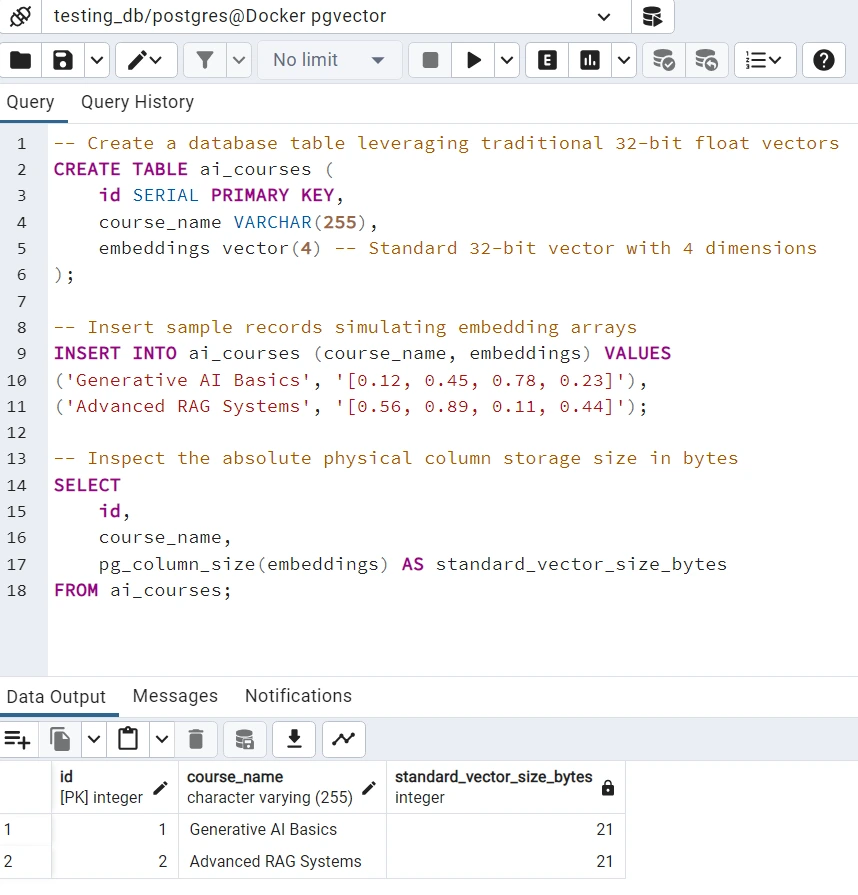
The above image with table ai_course with embedding vector default standard 32 bit vector storing in the database. and see it 21 byte size
Now, compare with the below output you can clearly see the output of the 2nd table ai_course1 , the standard_vector_size_bytes embedding column is 13 . so, we just compressed reduced the almost 50 % percent of bytes on every row of the embedding column, with just adding a vector quantization halfvec vector
-- Create a database table leveraging traditional 16 -bit float vectors using halfvec
CREATE TABLE ai_courses1 (
    id SERIAL PRIMARY KEY,
    course_name VARCHAR(255),
    embeddings halfvec(4) -- 16 bit embedding vector bytes
);

-- Insert sample records simulating embedding arrays
INSERT INTO ai_courses1 (course_name, embeddings) VALUES
('Generative AI Basics', '[0.12, 0.45, 0.78, 0.23]'),
('Advanced RAG Systems', '[0.56, 0.89, 0.11, 0.44]');

-- Inspect the absolute physical column storage size in bytes
SELECT
    id,
    course_name,
    pg_column_size(embeddings) AS standard_vector_size_bytes
FROM ai_courses1;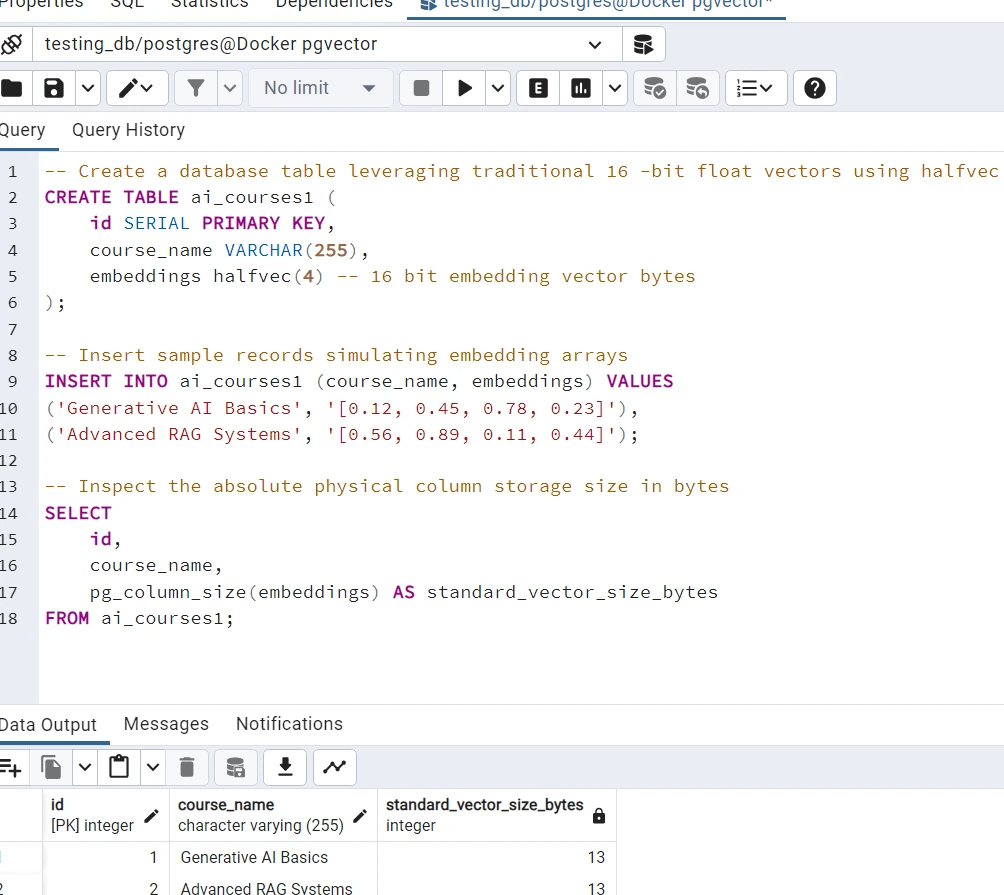
- Table Creation with Float Vectors You’re defining a table
ai_courseswhere each record holds a course name and a 4‑dimensional vector. Thevector(4)type here represents a traditional 32‑bit float array, which is the standard precision for embeddings in PostgreSQL with pgvector. This ensures compatibility with most machine learning models that output embeddings in float32. - Embedding Inserts The
INSERTstatements simulate real embeddings by storing arrays like[0.12, 0.45, 0.78, 0.23]. These mimic the numerical representation of semantic meaning for each course. In practice, these values would come directly from a model like OpenAI or Hugging Face. - Storage Inspection The
pg_column_size(embeddings)query is a clever way to measure the physical storage footprint of each vector. Developers use this to benchmark memory usage, especially when scaling embeddings to thousands or millions of rows. It helps answer: How much RAM or disk space does each embedding consume? - Why This Matters
- In production RAG systems, knowing the byte size of vectors is critical for buffer cache optimization.
- In cloud environments, it helps avoid over‑allocating memory on smaller instances.
- For performance tuning, smaller vectors mean faster similarity searches (cosine, L2, inner product).
Video Tutorial Real Time Scalar quantization
Frequently Asked Questions (FAQ)
1: What is halfvec in PostgreSQL pgvector?
A: It is a data type that stores vector embeddings as 16-bit half-precision floating-point numbers instead of standard 32-bit floats.
2: How does halfvec cut vector database RAM by 50%?
A: It reduces the structural storage size of each vector component from 4 bytes to 2 bytes, directly cutting memory and disk footprints in half.
3: Will using scalar quantization with halfvec ruin my search accuracy?
A: No, real-world benchmarks show that halfvec maintains a 99.9% semantic accuracy and recall rate compared to full-precision FP32 vectors.
4: Can I convert my existing 32-bit vector tables to halfvec?
A: Yes, you can alter your column data types directly or build an expression index using a cast operator like (embedding::halfvec(dimensions)).
5: Which pgvector version is required to use halfvec?
A: You must use pgvector version 0.7.0 or higher to access the halfvec type and its corresponding index operators.
Conclusion
Vector quantization with halfvec reduces embedding sizes by up to 50% by converting default 32-bit floating-point arrays into 16-bit formats. This drastically cuts database RAM usage while sustaining a 99.9% vector search accuracy rate.
By implementing this simple schema shift in pgvector, you protect your production RAG pipelines from infrastructure memory bloat while keeping your semantic retrieval lightning-fast for generative search engines.