


Introduction: Python RAG System Overview
Before continuing this tutorial, make sure you’ve read the previous post: Build a Powerful Semantic Search Engine in 3 Steps (Pinecone + OpenAI), as this guide is a continuation of that implementation and builds directly on the concepts covered there.
From my experience building AI applications, one of the most exciting projects was learning how to build a Python RAG system with Pinecone and OpenAI. My goal was simple—understand how to create an AI search engine that works more like Google using Python, Pinecone, and OpenAI, instead of relying on traditional keyword matching.
Most keyword-based search systems fail because users phrase the same intent in different ways. That’s why I moved toward vector database embeddings and semantic search, which focus on meaning rather than exact word matches. This shift completely changed how I think about building modern retrieval systems.
Detailed post about Semantic vs Keyword Search: Powerful AI Vector Guide 2026
In this guide, I’ll explain how text is converted into embeddings using OpenAI’s text-embedding-3-small model, stored efficiently in Pinecone, and then used to retrieve the most relevant results. By combining embeddings with semantic search, the system can understand user intent even when the query wording is different.
The result is a smarter and more flexible search experience—similar to building an AI-powered vector database search engine that understands context instead of just keywords.
What is RAG & Semantic Search in AI?
Before we go deeper into implementation, it’s important to understand the core idea behind this system. This tutorial continues from build ai search engine like google using python pinecone openai, where we already covered the basics of embeddings and search.
Retrieval-Augmented Generation (RAG) is an AI approach where we first retrieve relevant information from a knowledge source and then use a language model to generate a response based on that context. Instead of relying only on pre-trained knowledge, the model can use external data at runtime to produce more accurate and grounded answers. For More Detailed 7 Critical RAG Production Pitfalls (Python Fixes)
To make retrieval effective, we use semantic search. Unlike keyword-based search, semantic search focuses on meaning. It converts text into vector representations so that similar concepts are placed closer together, even if the wording is different. This is what allows the system to understand user intent more naturally.
When combined, RAG and semantic search enable a powerful workflow: retrieve the most relevant context from a vector database like Pinecone, and then pass it to an OpenAI model to generate a contextual response. This is the foundation of modern AI-powered search and intelligent retrieval systems.
Vector Databases & Pinecone Explained
To understand how this system works under the hood, we first need to understand vector databases. Traditional databases store structured data like text, numbers, and records, but they are not designed to understand meaning. Vector databases solve this problem by storing numerical representations of data called embeddings, which capture the semantic meaning of text.
When a user query is converted into an embedding, it can be compared with stored embeddings to find the most similar results. This is what makes semantic search possible at scale.
(open free trial account) Pinecone is a managed vector database that makes this process efficient and production-ready. It allows us to store embeddings, perform fast similarity searches, and retrieve relevant context in milliseconds, even with large datasets. Instead of handling indexing and search optimization manually, Pinecone manages it internally, which simplifies building scalable AI applications.
In this project, Pinecone acts as the retrieval layer of the system. It stores all document embeddings and quickly returns the most relevant matches when a query is received. This becomes a core part of our RAG pipeline.
All the concepts we discussed here will be implemented step by step in the coding section, where we will build the complete system from embedding generation to retrieval and response generation.
OpenAI Embeddings for AI Search
To make semantic search work effectively, we first need to convert text into a format that machines can understand and compare. This is where embeddings come in. An embedding is a numerical representation of text that captures its meaning, allowing similar ideas to be placed closer together in vector space.
In this project, I’ve used OpenAI’s embedding model (`text-embedding-3-small`) to transform input text into high-quality vectors. These vectors are designed to preserve contextual meaning, so even if two sentences are written differently, they can still be matched based on intent.
Once generated, these embeddings are stored in our vector database and later used during query time to find the most relevant matches. This is the foundation that connects user input with meaningful results in our system.
In the upcoming coding section, we will generate these embeddings step by step and integrate them into our retrieval pipeline.
Building the RAG System (Full Code Implementation)
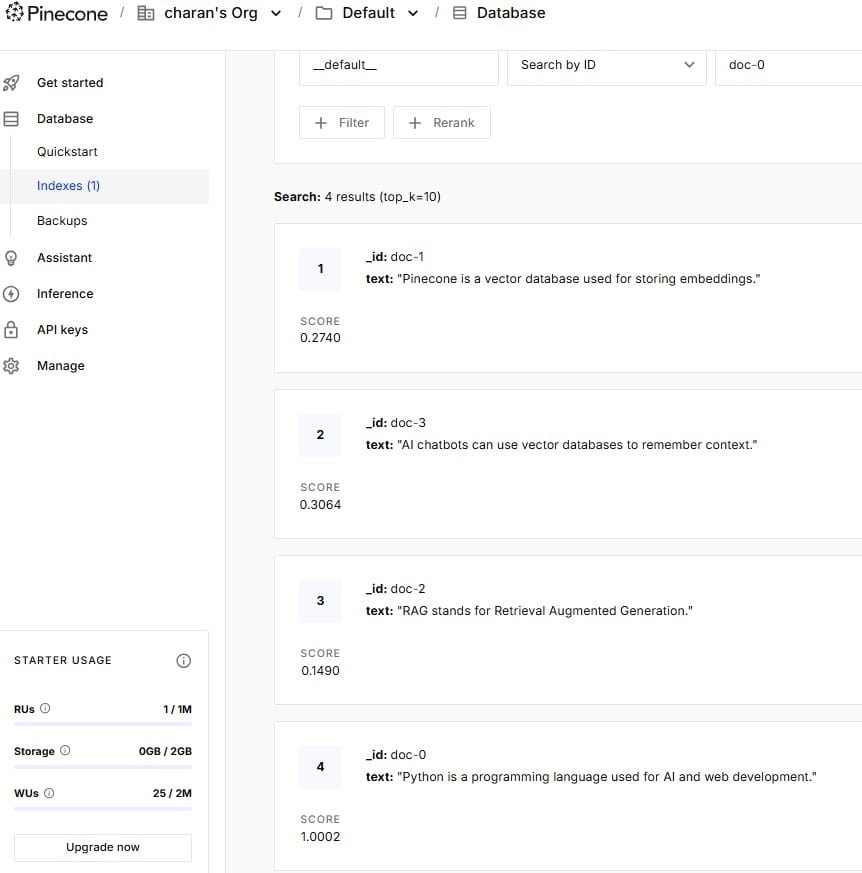
Note: This is very important—this blog is a continuation of the previous post Store Embeddings in Pinecone OpenAI Tutorial 2026. In that article, we already stored raw data as embeddings in a Pinecone vector database using Python. So before implementing the search functionality, make sure your embedded data is already available in your vector database. Refer to the image below for clarification.
Setting Up Python Environment (.env + Keys)
I am using VS Code for this project, so the first step is to create a .env file in our Python project. I use a .env file because it provides a secure way to store sensitive information such as API keys, database connection strings, and other configuration details in Python applications.
Before proceeding, you need a valid OpenAI API key (this is not completely free). Free-tier or trial keys may not work in this project, and you may encounter an error like “no credits or limit reached (0)”, which usually happens when using free-tier services such as Gemini without an active billing account, or when OpenAI/Anthropic free credits have already been exhausted.
Now, coming to the coding part—create a new file named .env (note: do not add any extension, just .env). Inside this file, we will store our OpenAI API key, Pinecone API key, and the RAG index name. Refer to the image below for the exact configuration I have used.

Building the RAG System (Full Code Implementation)
In VS Code, go the terminal and copy these installation command
pip install openai pinecone-client python-dotenv numpy tqdm
Now, this is the Python file (semantic_search.py) where we define all the required packages, write the core logic, and connect everything together. The API keys and configuration values are securely stored in the .env file, which we load into our project. Below the code section, I will explain each part in detail so you can clearly understand how the system works end-to-end.
import os
from dotenv import load_dotenv
from openai import OpenAI
from pinecone import Pinecone

load_dotenv(override=True)

client = OpenAI(api_key=os.getenv("OPENAI_API_KEY"))
pc = Pinecone(api_key=os.getenv("PINECONE_API_KEY"))

index = pc.Index(os.getenv("PINECONE_INDEX"))


def get_embedding(text):
    return (
        client.embeddings.create(model="text-embedding-3-small", input=text)
        .data[0]
        .embedding
    )


def search(query, top_k=5):
    query_vector = get_embedding(query)

    results = index.query(vector=query_vector, top_k=top_k, include_metadata=True)

    matches = results["matches"]
    matches.sort(key=lambda x: x["score"], reverse=True)

    print("\n🔎 Results:\n")

    found = False

    for match in matches:
        # STRICT FILTER (important)
        if match["score"] < 0.45:
            continue

        found = True
        print(f"Score: {match['score']:.4f}")
        print(match["metadata"]["text"])
        print("-" * 50)

    if not found:
        print("❌ No relevant results found.")


if __name__ == "__main__":
    while True:
        query = input("🔍 Ask something: ")

        if query.lower() == "exit":
            break

        search(query)
The above Python file is responsible for the search functionality of our system. After storing embeddings in Pinecone, this script allows users to ask questions and get relevant results based on meaning.
1. Loading Environment and Connections
We first load the .env file and connect to:
- OpenAI API → to convert user queries into embeddings
- Pinecone Index → where our stored embeddings exist
This ensures both search input and stored data use the same vector space.
2. Creating Embeddings for User Query
We define a function:
def get_embedding(text):
This converts the user’s query into a vector using OpenAI’s text-embedding-3-small model.
So instead of searching words, we search meaning.
3. Semantic Search Function
The main logic is inside:
def search(query, top_k=5):
Here’s what happens step-by-step:
- User query is converted into an embedding
- Pinecone searches for the most similar vectors
- It returns the top matching results (
top_k)
4. Sorting and Filtering Results
After getting results:
- We sort them based on similarity score
- We filter out weak matches using a threshold (
score < 0.45) - This improves result quality and removes irrelevant matches
Only strong semantic matches are shown.
5. Displaying Results
If relevant matches are found:
- We print the similarity score
- We print the original stored text
- A separator is added for readability
If nothing matches well:
❌ It shows “No relevant results found.”
6. Interactive Search Loop
At the end:
while True:
This allows continuous searching:
- User types a query
- System returns results instantly
- Typing
exitstops the program
🚀 In Simple Terms
This file does the following:
👉 Takes user input
👉 Converts it into embeddings
👉 Searches similar embeddings in Pinecone
👉 Returns the most meaningful results
👉 Runs as an interactive search tool
💡 Key Idea
This is not keyword search. It is semantic search, meaning:
- “AI programming” and “machine learning basics” can still match even if exact words are different.
Final Output AI Search Engine Like Google
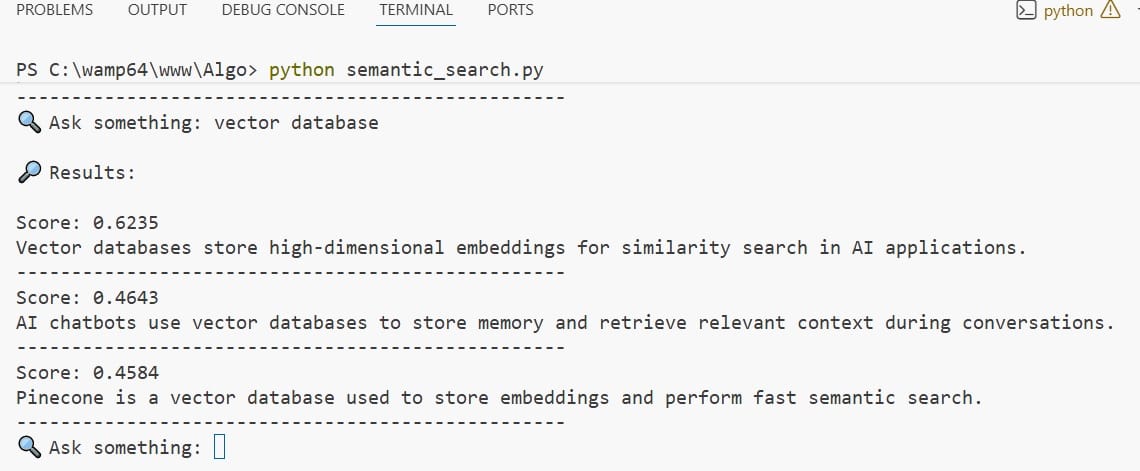
Notice the output, i got a perfect semantic search functionality like google search engine. It displays the finding results based on intent and meaning instead of exact keywords
Error Fixes & Performance Optimization
While building this project, I ran into a few real issues that are worth sharing, as they can save you a lot of debugging time.
One of the first errors I faced was an “API key not valid” issue, even though I had already added the correct key in my .env file. The problem was that the old environment variables were still being used. To fix this, I used:
load_dotenv(override=True)Code language: PHP (php)This ensures that the latest values in your .env file override any previously loaded environment variables. After adding override=True, the API key worked correctly.
Another issue I noticed was related to small datasets in the vector database. When there are only a few records stored, the system tends to return almost all entries regardless of the query. This happens because there aren’t enough meaningful variations for proper similarity comparison. To get accurate results, make sure you store a good amount of diverse data in your vector database.
I also improved the result quality by adjusting the score filter. Without filtering, even weak matches are shown, which makes the output less useful. By setting a threshold (for example, score < 0.45), I was able to remove low-relevance results and keep only meaningful matches.
These small fixes—handling environment variables properly, using a sufficient dataset, and tuning the score threshold—made a significant difference in both accuracy and overall performance of the system.
Real-World Applications of RAG Systems
| Use Case | Description | Example |
|---|---|---|
| AI Chatbots | Retrieve relevant context and generate intelligent responses in real time. | Customer support bots, virtual assistants |
| Enterprise Search | Search across internal documents with context-aware results. | Company knowledge base, HR policy search |
| Document Q&A Systems | Answer questions based on PDFs, docs, or datasets. | Legal docs, research papers |
| E-commerce Search | Improve product search using intent-based matching. | Amazon-style smart search |
| Healthcare Assistants | Retrieve medical knowledge and assist professionals. | Clinical decision support tools |
| Personal AI Assistants | Store and retrieve personalized memory or knowledge. | Note-taking AI, productivity tools |
These are some of the most common real-world use cases where RAG systems are applied to combine retrieval and generation for smarter, context-aware AI applications.
FAQ
1) What happens when I type a query in the search?
When you enter a query, it is converted into an embedding using OpenAI and compared with stored vectors in Pinecone. This is how a Python RAG system with Pinecone and OpenAI retrieves the most relevant results based on meaning.
2) Why do I get different results for similar questions?
Even if questions are worded differently, Semantic Search focuses on intent rather than exact words. Small variations in phrasing can slightly change similarity scores, which may affect ranking.
3) Why am I getting too many results?
This usually happens when your dataset is small or the score filter is too low. With limited vector database embeddings, the system may return most of the stored data instead of filtering meaningful matches.
4) Why am I getting “No relevant results found”?
This can happen if the similarity score is below your threshold or if your stored embeddings do not match the query intent well in your Python RAG system with Pinecone and OpenAI.
5)Can I search anything using this system?
You can search only what is available in your vector database. This is how you build AI search engine like Google using Python Pinecone OpenAI, where results depend on the data you provide.
6) How can I improve search accuracy?
You can improve results by adding more high-quality data, increasing dataset size, and optimizing vector database embeddings along with proper score filtering in your Semantic Search pipeline.
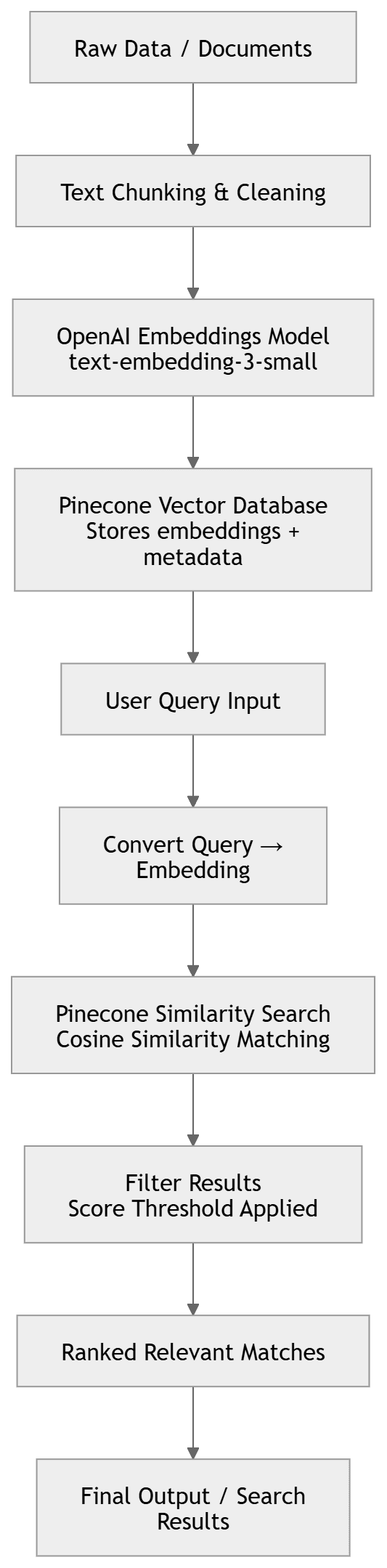
System Workflow Flowchart (Visual Representation)
Conclusion
This project helped me understand how real AI search systems work in practice. I started with basic keyword search, but after moving to embeddings and semantic search, the results became much more accurate and meaningful.
While building it, I faced real issues like API key errors and low-quality results due to small datasets. Fixing these taught me the importance of proper setup and good data in a vector database.
Overall, this project gave me a clear hands-on experience of how a Python RAG system with Pinecone and OpenAI works behind the scenes and how modern AI search engines understand user intent instead of just matching words.