

- Environment Setup: Store your host, user, and password inside a hidden
.envfile. - Security First: Add
.envto your.gitignorefile before making your first commit to protect your data. - Dependency Injection: Install and use the
python-dotenvlibrary to manage variables securely. - Secure Retrieval: Load variables into your application memory using
os.getenv()functions. - Database Link: Connect directly to your local pgAdmin 4 instance on port
5432using the loaded credentials.
When you look at beginner tutorials, they usually teach you to load five different variables (HOST, PORT, USER, PASSWORD, DBNAME) and pass them one by one into your python postgresql script.
Here is the reality: in a real production environment, we almost never do that.
Instead, we use a single Database Connection URL. It’s cleaner, it’s exactly how modern cloud hosts (like AWS, Render, or Heroku) format their credentials, and it makes moving from your local pgAdmin 4 environment to a live server completely frictionless.
Introduction
In this post, I’ll explain in a simple and clear way How To Secure PostgreSQL Connection String In Python (pgAdmin 4) in a ".env” file. This approach helps protect sensitive data like usernames and passwords from being exposed in your code. I’ll also cover why using a .env file is considered a best practice and the key advantages it offers in real-world applications. If you are interested Build AI That Convert English to PostgreSQL SQL Using Python (Step-by-Step Guide)
What is PostgreSQL & Why It Matters for AI Embeddings?
PostgreSQL is an open-source relational database management system (RDBMS) known for reliability, scalability, and strong data integrity. It is widely used in production systems to store structured data efficiently.
In the context of AI and embeddings, PostgreSQL becomes powerful when extended with tools like pgvector, allowing it to store and search high-dimensional vector data generated by models such as OpenAI embeddings with Pinecone.
This enables features like:
- Semantic search (search by meaning, not keywords)
- Recommendation systems
- AI-powered chat memory
- Similarity matching for documents or products
Unlike traditional databases that rely only on exact matches, PostgreSQL with vector support can understand relationships between data points using mathematical similarity (cosine or Euclidean distance). PostgreSQL is also widely used in modern AI applications, especially with vector search and embeddings.
This makes it a strong choice for AI applications where structured + unstructured data must work together.
What is PostgreSQL Connection String in Python?
A Python PostgreSQL connection string is simply the information your application needs to connect to a PostgreSQL database. From my experience working with Python projects, setting up this connection correctly is one of the first things I focus on before building any backend system.
When I was configuring my development environment in VS Code, I followed this guide on how to Connect PostgreSQL to VS Code to properly set up the database connection and make sure everything worked smoothly during development. It really helped me avoid common setup issues that usually happen when the environment is not configured correctly.
It includes details like:
- database server (host)
- database name
- username
- password
- port number
👉 In short, it tells your Python program how and where to connect to the database.
Why Use .env File for Database Security?
In any application, we need to store important database details like username, password, host, and port. If we write these details directly inside our Python code, it becomes unsafe because anyone who accesses the code can see them.
This is where the .env file becomes very useful.
Instead of hardcoding sensitive information, we store it inside a separate .env file and load it in our Python project using python-dotenv.
This makes our project more secure, clean, and production-ready.
By using .env file, we can easily:
- protect sensitive credentials 🔐
- avoid exposing database information in code
- manage different environments (development, testing, production) easily
- update values without changing code
So, .env file is a simple but very powerful way to improve security in Python projects, especially when working with databases like PostgreSQL.
Advantages of Using .env File
1. Improved Security
Storing database credentials in a .env file keeps sensitive information like usernames and passwords out of your main code. This reduces the risk of exposing data when sharing or uploading your project online.
2. Easy Configuration Management
With a .env file, you can update database details without modifying your Python code. This makes it easier to manage different environments like development, testing, and production.
3. Safer Code Sharing
When you exclude the .env file from version control (using .gitignore), you can safely share your code on platforms like GitHub without exposing your database credentials.
4. Reusable Across Multiple Files
Once you store your database credentials in a .env file, you can reuse the same configuration across multiple Python files. This avoids duplication and keeps your project clean and consistent, especially in larger applications.
Using a .env file is a simple yet powerful way to make your Python applications more secure, flexible, reusable, and production-ready.
Disadvantages of Using .env File
1. Not Safe if Exposed
A .env file is secure only if it remains private. If you accidentally upload it to GitHub or share it publicly, your database credentials can be exposed.
👉 Unlike encrypted storage, .env files store data in plain text.
Simple Explanation
Think of a .env file like a notebook where you write your passwords.
- ✔ Safe if you keep it private
- ❌ Risky if someone else gets access
🔒 How to Avoid This Problem
- Always add
.envto.gitignore
(Adding.envto.gitignoreensures that sensitive configuration files are not uploaded to version control systems like GitHub, keeping credentials secure.) - Never share it publicly
- Use environment variables in production servers
- Rotate passwords if exposed
Let’s Start The coding Part. In this example my project located in “C:\wamp64\www\Algo” and inside the Algo folder i created “.env” and “Secure-postgre-conn.py”
first open your .env file
Install Required Libraries (psycopg2 & dotenv)
✅ Step 1: Install Required Libraries
pip install psycopg2-binary python-dotenv
psycopg2→ It Connects Python PostgreSQL connectionpython-dotenv→ Loads environment variables from a.envfile
Create and Configure .env File
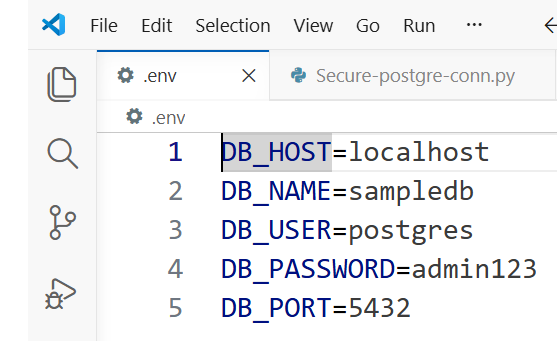
In your project folder, create a file named called .env and this env file doesn’t contains any prefix
Add your database credentials and replace without your own password
DB_HOST=localhost
DB_NAME=mydatabase
DB_USER=myuser
DB_PASSWORD=mypassword
DB_PORT=5432
👉 This file keeps sensitive data outside your code. Below is my own connection string properties image, just add according to your connection string properties
and Here is the complete tutorial How to Reset PostgreSQL User Password in pgAdmin 4 & psql (Step-by-Step Guide)
Now, Now let’s see how to secure Python PostgreSQL connection with a practical example “Secure-postgre-conn.py”
Python Code for Secure PostgreSQL Connection
import os
import psycopg2
from dotenv import load_dotenv

# Load environment variables
load_dotenv()

def get_connection():
    try:
        connection = psycopg2.connect(
            host=os.getenv("DB_HOST"),
            database=os.getenv("DB_NAME"),
            user=os.getenv("DB_USER"),
            password=os.getenv("DB_PASSWORD"),
            port=os.getenv("DB_PORT"),
        )
        print("✅ Connection successful")
        return connection

    except Exception as e:
        print("❌ Connection failed:", e)
        return None

# Example usage
conn = get_connection()

if conn:
    cursor = conn.cursor()
    cursor.execute("SELECT version();")
    print(cursor.fetchone())
    cursor.close()
    conn.close()
Test PostgreSQL Connection
Output of my code
PS C:\wamp64\www\Algo> python secure-postgre-conn.py
✅ Connection successful
(‘PostgreSQL 16.0, compiled by Visual C++ build 1935, 64-bit’,)
PS C:\wamp64\www\Algo>
📌 First, I imported the required packages
import os
import psycopg2
from dotenv import load_dotenv
First, I imported the required libraries:
- I used os to read environment variables
- I used psycopg2 to connect Python with PostgreSQL
- I used load_dotenv from python-dotenv to load my
.envfile
These packages help me keep my database credentials secure and separate from my code.
📌 Then, I loaded the .env file
load_dotenv()
After importing packages, I loaded the .env file.
This step makes sure all my database details like:
- host
- database name
- username
- password
- port
are available inside my Python script.
📌 Next, I created a function for database connection
def get_connection():
Then I created a function called get_connection().
I wrote this function so that I can reuse the database connection anywhere in my project without repeating code.
📌 Inside the function, I connected PostgreSQL
connection = psycopg2.connect(
    host=os.getenv("DB_HOST"),
    database=os.getenv("DB_NAME"),
    user=os.getenv("DB_USER"),
    password=os.getenv("DB_PASSWORD"),
    port=os.getenv("DB_PORT"),
)
Inside the function, I used psycopg2.connect() to connect to PostgreSQL.
Instead of writing credentials directly, I used:
👉 os.getenv()
This reads values from the .env file.
This makes my code:
- more secure 🔐
- easy to update
- production ready
📌 Then I added a success message
print(" Connection successful")
return connection
If the connection works properly, I print a success message and return the connection object so I can use it later.
📌 I also handled errors properly
except Exception as e:
    print(" Connection failed:", e)
    return None
If anything goes wrong (wrong password, server not running, etc.), I catch the error and print it.
This helps me easily debug issues while developing.
📌 Then I used the function
conn = get_connection()
After defining the function, I called it and stored the connection in a variable called conn.
📌 If connection is successful, I run a query
if conn:
    cursor = conn.cursor()
    cursor.execute("SELECT version();")
    print(cursor.fetchone())
If the connection is successful:
- I create a cursor object
- I use it to execute SQL queries
- Here I run
SELECT version();to check my PostgreSQL version
📌 Finally, I closed the connection
cursor.close()
conn.close()
At the end, I always close:
- cursor
- connection
This is important because it:
- frees system resources
- avoids memory leaks
- keeps database performance stable
🎯 Final Summary
So in this code, I:
- imported required packages
- loaded environment variables
- created a reusable connection function
- connected PostgreSQL securely using
.env - executed a test query
- and properly closed the connection
Common Errors & Fixes
While working with PostgreSQL in Python, sometimes we may face connection or runtime errors. These errors are normal and usually happen due to small configuration mistakes.
Here are some common issues I faced and how I fixed them:
❌ 1. Connection Refused Error
This error usually happens when PostgreSQL server is not running or the host/port is incorrect.
Fix:
- Make sure PostgreSQL service is running
- Check your
DB_HOSTandDB_PORTin.envfile
❌ 2. Authentication Failed
This happens when username or password is wrong.
Fix:
- Double-check
DB_USERandDB_PASSWORDin.envfile - Make sure the user has proper database permissions
❌ 3. Database Does Not Exist
This error appears when the database name is incorrect.
Fix:
- Verify
DB_NAMEin.envfile - Create the database in pgAdmin if it does not exist
❌ 4. psycopg2 Module Not Found
This happens when the required library is not installed.
Fix:
pip install psycopg2
or
pip install psycopg2-binary
❌ 5. .env File Not Loading
Sometimes environment variables are not detected.
Fix:
- Make sure you added
load_dotenv()at the top of your code - Check that
.envfile is in the correct project folder
🎯 Summary
Most PostgreSQL connection issues are simple configuration problems. Once everything is set correctly, your Python application will connect smoothly without any errors.
🚀 Advanced: Vector Database in Python (AI Use Case)
In modern applications, databases are not only used for storing structured data, but also for handling AI-powered features like semantic search and recommendations.
This is where vector databases come into play.
A vector database stores data in the form of embeddings (numerical representations of text or information). These embeddings help the system understand the meaning behind the data instead of just matching keywords.
In Python, PostgreSQL can also be used as a vector database with extensions like pgvector, which allows us to store and search embeddings efficiently.
This is especially useful in AI applications such as:
- Semantic search systems 🔍
- Recommendation engines 🎯
- AI Chatbots with memory 🤖
- Similar document matching 📄
Instead of traditional exact-match search, vector databases help us find results based on similarity and context.
👉 If you are exploring AI with Python and SQL, this is one of the most powerful concepts you will come across.
FAQ
1. How do I connect Python PostgreSQL connection?
You can use the psycopg2 library and provide database details like name, user, password, and host.
2. What is psycopg2?
It is a Python library used to connect and work with PostgreSQL databases.
3. Why should we not hardcode database credentials in Python?
If you write your database username and password directly in your code, anyone who sees your code can also see those details. This is risky, especially if you upload your project online. Using a .env file keeps your credentials separate and safer.
4. How do you securely connect to PostgreSQL in Python?
The simple way is to store your database details in a .env file and then read them in your Python code using os.getenv(). After that, you can use psycopg2 to connect to the database without exposing your password in the code.
5. What is a .env file and why is it used?
A .env file is just a file where you store important values like database username, password, or API keys. It helps you keep your code clean and makes it easier to manage settings without changing your code again and again.
6. Can we have multiple .env files in one project?
Yes, you can have multiple .env files in one project. This is usually done for different environments like development and production. You can load the required .env file in your Python code based on your setup.
Conclusion
By following these steps, you can maintain a Secure PostgreSQL Connection String In Python without exposing passwords, using a .env file.