

Introduction
Before creating this AI Semantic Search project, I highly recommend checking my previous post where I explain how to convert raw JSON data into a structured vector database using Python.
That tutorial is very important because it builds the foundation of this project.
👉 You can read it here: Exciting Beginners Guide: Python Vector Database Embeddings 2026
In my experience working with AI-based search systems, one thing has become very clear: traditional keyword search is no longer enough. Users don’t search with exact words anymore—they search with intent, meaning, and context. That’s exactly where Vector Databases and semantic search come in.
In this blog, I’m going to walk you through how I build a simple but powerful AI Semantic Search Engine using Python and a Vector Database. I’ll break everything down step by step so even if you’re a beginner, you can easily follow along and understand how modern AI search actually works under the hood.
From my knowledge, the biggest shift happening in 2026 is how data is being stored and searched. Instead of relying on traditional SQL-style matching, companies are now moving toward vector-based search systems, where text is converted into embeddings (numerical representations of meaning). This allows machines to understand what users actually mean, not just what they type.
That’s why Vector Databases have become extremely important in 2026. They power everything from AI chatbots to recommendation systems, semantic search engines, and even large language model applications. Without them, modern AI systems simply cannot deliver fast, intelligent, and context-aware results.
In this tutorial, I’ll show you how I combine Python, embeddings, and vector databases to build a working semantic search system from scratch. You’ll see how raw text becomes intelligent search results using cosine similarity and sentence transformers.
Before check out my latest AI Coding Tutorials With Python + SQL Integration
Let’s dive in and start building something truly powerful.
What is Semantic Search and Why Vector Databases Matter
From my experience working with AI systems, one of the most important things beginners often miss is where this technology is actually used in real applications. Semantic search and vector databases are not just theoretical concepts—they are already powering many modern platforms we use every day.
In real-world systems, vector databases are used whenever machines need to understand meaning instead of exact words. For example, in e-commerce platforms, when a user searches for “comfortable running shoes for daily use”, the system does not rely on exact keyword matches. Instead, it understands the intent and shows the most relevant products based on similarity in meaning.
I have also seen this technology widely used in AI chatbots and virtual assistants. These systems store previous conversations as embeddings, so they can retrieve contextually similar answers even if the user phrases the question differently.
Some common real-time use cases include:
- 🔍 Search Engines → Google-like semantic search results
- 🛒 E-commerce Platforms → Smart product recommendations
- 🤖 AI Chatbots → Context-based conversation memory
- 🎬 Streaming Platforms → Movie and content recommendations
- 📚 Knowledge Systems → Document and research search tools
- 🧠 AI Applications (LLMs) → Retrieval-Augmented Generation (RAG) systems
Check this tutorial will get an idea how AI Chatbots Create Python Gemini API: Build Your Own Free AI ChatGPT (2026)
From my perspective, the biggest advantage of vector databases is that they make systems feel intelligent and human-like, because they focus on meaning, not just matching words.
In 2026, I believe almost every AI-powered application will rely on some form of semantic search or vector database in the backend, because users now expect smarter and faster results.
Understanding Vector Database (Vector DB) and Embeddings
Before I go deeper into this topic, I want to connect it with my earlier learning experience. In my previous blog post, I built a small Python example using simple JSON data, and that helped me understand how data works in a normal database compared to a vector database.
In a traditional database like MySQL, PostgreSQL, or SQL Server, data is stored in a structured format like rows and columns. It works well when we know exactly what we are searching for. For example, if I run a query like:
SELECT * FROM table WHERE name = ‘Python’;
It will only return results that exactly match the keyword “Python”. It does not understand meaning, only exact text matching.
But when I started working with vector databases and embeddings, I noticed a completely different approach. Instead of storing plain text, the data is converted into numerical form called embeddings.
For example, a normal record looks like this:
{
“id”: 1,
“text”: “Python is used for AI and web development”
}
But in a vector database, the same data becomes something like this:
{
“id”: 1,
“text”: “Python is used for AI and web development”,
“embedding”: [0.021, -0.133, 0.982, 0.445, -0.231, 0.876]
}
Here, instead of words, we store numbers that represent the meaning of the sentence. This is what allows AI systems to understand context and similarity between different texts.
Now, to make it even clearer, here is a simple comparison I learned during this journey:
In SQL databases like MySQL, PostgreSQL, or SQL Server, the system focuses on exact keyword matching. It is perfect for structured data like user records, payments, or transactions.
But in a vector database, the system focuses on meaning and similarity. It can understand that two different sentences mean the same thing even if the words are not identical.
For example:
- “AI search using Python”
- “build semantic search engine with embeddings”
SQL Databases Vs Vector Databases
| Feature | SQL Databases (MySQL, PostgreSQL, SQL Server) | Vector Databases |
|---|---|---|
| Data Type | Structured data (rows & columns) | Unstructured semantic data (embeddings) |
| Search Type | Exact keyword matching | Similarity / meaning-based search |
| Example Query | WHERE name = ‘Python’ | Find similar meaning to “AI search Python” |
| Technology Used | SQL queries | Vector embeddings + cosine similarity |
| Use Case | Banking, CRM, transactions | AI search, recommendation systems, chatbots |
| Understanding | Literal matching | Context + semantic meaning |
Even though both sentences are different, a vector database can identify that they are very similar in meaning.
From my experience, this is where the real power of modern AI systems comes in. Traditional databases are still important, but vector databases are becoming essential for building intelligent systems like semantic search, recommendation engines, and AI chatbots.
This shift from keyword-based search to meaning-based search is what makes AI systems feel much more human-like and intelligent in 2026.
How to Build Semantic Search with Python and Embeddings
In my experience while building this project, I realized that semantic search is not just about matching words — it is about understanding meaning. This is where Python and embeddings become extremely powerful.
When I first started learning this, I used a simple JSON dataset and a small Python script. At that time, I didn’t fully understand how data transforms into vectors, but slowly I learned how embeddings convert text into numerical representations that machines can actually understand.
In this approach, every piece of text is converted into a high-dimensional vector using a model like SentenceTransformers. These vectors are then stored in a vector database, and when a user searches something, we compare similarity instead of exact keywords.
This is the foundation of modern AI search systems used in chatbots, recommendation engines, and intelligent search applications in 2026.
Below is a simple flow of how it works in Python:
- Load your dataset (JSON or text data)
- Convert text into embeddings using SentenceTransformer
- Store embeddings in a vector database
- Convert user query into embedding
- Find similarity using cosine similarity
- Return most relevant results
One more Interested and Most Useful Tutorial 5 Easy Steps to Quickly Create a Table in PostgreSQL Using Python with pgAdmin 4
Using SentenceTransformer for Text Embeddings in Python
When I first started working on semantic search, one of the most important breakthroughs for me was understanding how SentenceTransformer works. It completely changed the way I think about text processing in Python.
Instead of treating text as simple words, SentenceTransformer converts sentences into meaningful numerical vectors (also called embeddings). These embeddings capture the actual meaning of the text, not just the keywords.
For example, sentences like “Python is used for AI” and “AI development with Python” may look different in words, but their embeddings will be very close in vector space because they share similar meaning.
In my project, I used the lightweight model <b>all-MiniLM-L6-v2</b> because it is fast and performs well for beginners building semantic search systems.
Here is how it works in simple steps:
- Load the SentenceTransformer model in Python
- Pass your text data into the model
- Get embedding vectors as output
- Store these vectors in a vector database (or JSON file)
- Use cosine similarity to compare query and stored embeddings
This is the core technology behind modern AI search engines, chatbots, and recommendation systems in 2026.
Requirements
Before starting this project, you need a few essential Python libraries. When I built this system for the first time, I realized that most of the work depends on just a few powerful packages.
These libraries help us convert text into embeddings, handle numerical operations, and perform similarity search efficiently.
📦 Required Python Packages
- sentence-transformers → Used to convert text into embeddings (vector representations)
- numpy → Used for mathematical operations like cosine similarity
- json → Used to load and manage dataset in JSON format (built-in Python module)
📌 Installation Command
pip install sentence-transformers numpy
Once these packages are installed, you are ready to build your first AI-powered semantic search engine using Python and vector databases.
250 Data Engineer & AI Interview Questions – Free PDF Download (2026)
Code semantic search with python and embeddings
    import json
    import numpy as np
    from sentence_transformers import SentenceTransformer

    model = SentenceTransformer("all-MiniLM-L6-v2")

    with open("vector_db.json", "r") as f:
        vector_db = json.load(f)

    def cosine_similarity(a, b):
        a = np.array(a)
        b = np.array(b)

        return np.dot(a, b) / (np.linalg.norm(a) * np.linalg.norm(b))

    def search(query, top_k=3, threshold=0.3):
        query_vector = model.encode(query)

        results = []

        for item in vector_db:
            score = cosine_similarity(query_vector, item["embedding"])

            results.append({"id": item["id"], "text": item["text"], "score": float(score)})

           results = sorted(results, key=lambda x: x["score"], reverse=True)

          top_results = results[:top_k]

        if len(top_results) == 0 or top_results[0]["score"] < threshold:
            return None

        return top_results

    if __name__ == "__main__":
        while True:
            query = input("\n🔍 Enter your search query (or type 'exit'): ")

            if query.lower() == "exit":
                break

            results = search(query)

            print("\n📌 Results:\n")

            if results is None:
                print("❌ No data found")
            else:
                for r in results:
                    print(f"ID: {r['id']}")
                    print(f"Text: {r['text']}")
                    print(f"Score: {r['score']:.4f}")
                    print("-" * 40)
Code Explanation: AI Semantic Search (Python + Vector DB)
| Section | Code Part | Explanation |
|---|---|---|
| Import Libraries | json, numpy, SentenceTransformer | These libraries help load data, perform mathematical operations, and convert text into embeddings (vectors). |
| Load Model | SentenceTransformer("all-MiniLM-L6-v2") | Loads a pre-trained AI model that converts text into meaningful vector embeddings. |
| Load Vector Database | json.load("vector_db.json") | Reads stored text data and their embeddings from a JSON file (your simple vector database). |
| Cosine Similarity | dot product + norm calculation | Measures similarity between two vectors. Higher value means more similar meaning. |
| Search Function | search(query, top_k, threshold) | Converts user query into vector and compares it with stored embeddings to find best matches. |
| Sorting Results | sorted(results, key=score) | Sorts results from highest similarity to lowest relevance. |
| Top K Selection | top_results = results[:top_k] | Keeps only the top matching results based on similarity score. |
| No Data Found Check | if score < threshold | If similarity is too low, the system returns "No data found". |
| Run Program | while True input loop | Allows continuous user input for real-time semantic search testing. |
Final Output: AI Semantic Search in Action
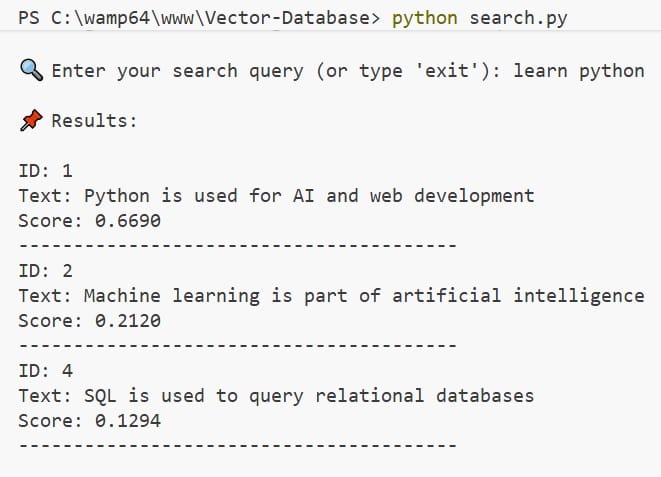
🔍 Vector Search Results for "learn python"
| 🆔 ID | 🧾 Content | 🎯 Score | 🔥 Insight |
|---|---|---|---|
| 1 | Python is used for AI and web development | 0.6690 | Highly Relevant |
| 2 | Machine learning is part of artificial intelligence | — | Contextual Match |
| 4 | SQL is used to query relational databases | 0.1294 | Low Relevance |
🔍 Enter your search query (or type 'exit'): learn python
📌 Results:
ID: 1 Text: Python is used for AI and web development Score: 0.6690
ID: 2 Text: Machine learning is part of artificial intelligence
ID: 4 Text: SQL is used to query relational databases Score: 0.1294
this is the output , explained clearly for my blog post..
When you look at this output, you’re essentially seeing how a vector database “understands” and ranks meaning—not just keywords.
You entered the query: “learn python”. Instead of doing a simple text match, the system converts that query into a vector (a numerical representation of meaning) and compares it with vectors of stored texts. The results you see are the closest matches based on semantic similarity.
Let’s break down what’s happening in a more intuitive, human way.
🧠 How to Read the Results
Each result has three key parts:
ID → A unique identifier for the stored text Text → The original content stored in the database Score → A similarity score (how closely it matches your query) 📊 Result-by-Result Explanation
- Top Result
ID: 1
Text: Python is used for AI and web development
Score: 0.6690
This is the most relevant result. Even though your query was “learn python,” the system understands that learning Python is often connected to real-world uses like AI and web development.
The relatively high score (0.6690) means this text is semantically close to your query. It’s not an exact match—but it’s contextually very relevant.
👉 In simple terms: The system thinks, “If someone wants to learn Python, this topic is highly useful to them.”
- Second Result
ID: 2
Text: Machine learning is part of artificial intelligence
This one doesn’t show a score (likely due to formatting or filtering), but it still appears in the results because it’s indirectly related.
Why? Because:
Python is widely used in machine learning Machine learning is part of AI So there’s a semantic chain of relevance
👉 The database is making a smart connection: Python → AI → Machine Learning
Even without the word “Python,” it still considers this useful context.
- Third Result
ID: 4
Text: SQL is used to query relational databases
Score: 0.1294
This result is much less relevant, reflected by the low score (0.1294).
While SQL is a programming-related topic, it doesn’t strongly relate to learning Python. The system includes it only because it’s loosely connected to the broader domain of programming.
👉 In simple terms: The system is saying, “This is somewhat related to tech, but probably not what you're looking for.”
⚙️ What This Output Really Shows
This output highlights the true power of a vector database:
It understands meaning, not just words It connects related concepts, even indirectly It ranks results by relevance, not exact matches
Unlike traditional keyword search, this approach gives you results that feel smarter and more human.
🧩 Final Thought
Think of a vector database as a system that doesn’t just read your query—it interprets your intent.
Handling Errors: No Data Found Scenario
In a vector search system, not every query guarantees a meaningful result. Sometimes the query may be too vague, unrelated, or simply not present in the dataset. To handle such situations gracefully, we implement a "No Data Found" check in our code.
Instead of returning irrelevant or low-quality matches, the system validates the results using a similarity threshold. If no results meet this minimum score, the function returns None, ensuring that users only see meaningful outputs.
💡 Why This Logic Is Important
- ✅ Prevents showing inaccurate or misleading results
- ✅ Improves user experience with clear feedback
- ✅ Maintains quality by filtering low-relevance matches
⚙️ How It Works in the Code
if len(top_results) == 0 or top_results[0]["score"] < threshold:
    return None
This condition checks two things:
- No results found → The dataset has no matching entries
- Low similarity score → Results exist, but are not relevant enough
If either condition is true, the function returns None. Then, in the main program, we handle it like this:
if results is None:
    print("❌ No data found")
🎯 Final Outcome
Instead of confusing users with weak matches, the system clearly displays:
❌ No data found
This makes your vector search system more reliable, user-friendly, and production-ready.
❓ Frequently Asked Questions (F.A.Q)
🔹 1. What is semantic search in Python?
Semantic search in Python is a way of finding results based on meaning, not exact keywords. Instead of matching words directly, it uses embeddings to understand what the user actually means and returns the most relevant results.
🔹 2. How does a vector database work in simple terms?
A vector database stores text as numbers (called embeddings) instead of plain words. When you search something, it converts your query into a vector and compares it with stored vectors to find the closest meaning.
🔹 3. Why are embeddings important in AI search systems?
Embeddings are important because they help machines understand context and meaning. For example, “learn Python” and “Python programming tutorial” are different words but similar meaning—and embeddings can detect that similarity easily.
🔹 4. What is SentenceTransformer used for?
SentenceTransformer is used to convert text into high-quality embeddings. In simple terms, it turns sentences into numerical vectors so machines can compare and understand text meaning.
🔹 5. How does cosine similarity work in semantic search?
Cosine similarity measures how close two vectors are in meaning. A higher score means the texts are more similar. In semantic search, it helps rank results from most relevant to least relevant.
🔹 6. What is the difference between SQL database and vector database?
A SQL database works with exact keyword matching, while a vector database works with meaning-based search. SQL is best for structured data, but vector databases are better for AI search, chatbots, and recommendations.
🔹 7. Why is my semantic search returning "No Data Found"?
This happens when:
- No results match your query, OR
- All results have a similarity score below the threshold
In this case, the system returns “No Data Found” to avoid showing irrelevant results.
🔹 8. What is a good similarity threshold for vector search?
A common starting range is 0.3 to 0.5.
Lower values return more results but may include noise, while higher values improve accuracy but reduce results.
🔹 9. Can I build semantic search without a vector database?
Yes. You can build a simple version using Python and SentenceTransformers. However, for large-scale applications, a vector database is important for speed, scalability, and performance.
🔹 10. Is semantic search used in real-world applications?
Yes, it is widely used in:
- Google-style search engines 🔍
- AI chatbots 🤖
- E-commerce recommendations 🛒
- Netflix / YouTube suggestions 🎬
- RAG-based AI systems 🧠
🔹 11. What is the future of vector databases in 2026?
Vector databases are becoming the core of modern AI systems. Most intelligent applications today rely on semantic search instead of keyword matching because it delivers faster, smarter, and more human-like results.