

Introduction: Pinecone OpenAI Tutorial 2026
In my experience working on AI systems and search-based applications, I’ve learned that the real power of modern search doesn’t come from keywords anymore—it comes from understanding meaning. That shift is exactly what led me into working with vector databases and embeddings in Python.
When I first started building semantic search systems, I quickly realized how important Vector Database and Embeddings Python workflows are for organizing and retrieving meaningful data at scale. Instead of relying on exact matches, we now store information as vectors that capture context, which completely changes how search works.
One of the most practical techniques I’ve used in real projects is Metadata filtering in Pinecone. It allows me to combine vector similarity with structured filters, so I can narrow down results intelligently without losing semantic accuracy. This becomes extremely useful when working with large datasets where precision matters.
You can see this applied in my RAG system implementation using Pinecone and OpenAI, where filtering plays a key role in improving retrieval quality.
In this Pinecone OpenAI Tutorial 2026, I’m going to share exactly how I build these systems step by step using real code and a simple knowledge base. My goal is to make this practical, so you can understand not just how it works, but also how you can apply it in your own AI projects in python.
I’ll walk you through everything from embeddings generation to storing vectors and querying them efficiently, based on my own hands-on experience building production-level search applications.
What is Semantic Search? (AI-Powered Search Explained)
Before Continue This part i would like to visit this clean keen detail information about Semantic vs Keyword Search
In my work building AI-driven applications, I’ve noticed that the biggest limitation in traditional search systems is that they depend heavily on exact keyword matching. If the user doesn’t phrase the query the same way the data is stored, the results often become weak or even irrelevant.
Semantic search solves this problem by focusing on meaning and intent instead of exact words. It allows the system to understand what the user is actually looking for, even if the query is written in a completely different way.
In real-world AI systems, moving from traditional database queries to vector-based search fundamentally changes how data retrieval works.
In a traditional database, search works like this:
- If I store:
"Python is used for AI development" - And the user searches:
"AI programming language" - A normal SQL or keyword-based search will likely return nothing, because the words don’t match exactly.
But in a semantic search system, the behavior is different:
- The same sentence is converted into embeddings
- The query is also converted into embeddings
- Even if the words are different, the system understands that both are related to AI and Python programming
So instead of missing results, the system can still return the correct match.
Another real example I’ve seen in practice:
- Query: “how to save AI memory”
- Traditional search: no relevant match
- Semantic search: returns results like “vector database storage”, “embedding storage”, “Pinecone knowledge base”
That’s the key difference—regular databases match text, semantic systems match meaning.
This is where embeddings become powerful. Every text is converted into a numerical vector that represents its meaning. Once data is stored in this format, we can compare similarity instead of relying on exact word matches.
In real-world AI systems, this approach is widely used in chatbots, recommendation engines, and document search tools where user queries are unpredictable.
As I move further in this guide, I’ll show you how I personally implement this using Python, OpenAI embeddings, and Pinecone to build a scalable semantic search engine from scratch.
Why Pinecone for Vector Database and Embeddings Python Projects
From my experience building AI search systems, I’ve realized that normal databases are not designed for working with embeddings. They handle structured data well, but they struggle when it comes to understanding meaning between sentences.
When I work on Vector Database and Embeddings Python projects, I need a system that can quickly compare vector similarity at scale. This is where Pinecone becomes useful because it is built specifically for storing embeddings and running fast semantic search.
For example, if I store:
- “best wireless headphones for travel”
And a user searches:
- “good headphones for flights”
A traditional database will not connect these queries, but Pinecone can still return relevant results because it understands semantic similarity instead of exact keyword matching.
In my projects, I also prefer Pinecone because it is simple to integrate with Python and works smoothly with OpenAI embeddings without managing complex infrastructure. It also offers a free tier, which makes it easy to start experimenting and building small projects without any initial cost.
For students, freshers, and job seekers, I see this as a very practical learning path. Practicing with Pinecone and embeddings gives real hands-on experience that directly maps to AI Engineer, AI Data Engineer, and Data Analyst roles. It’s not just theory—it becomes a roadmap to understanding how modern AI search and intelligent systems are actually built in production.
This makes it a strong starting point for anyone who wants to build real-world AI applications like chatbots, recommendation systems, or semantic search engines.
Connecting OpenAI API to Pinecone Vector Store
In real-world implementations of semantic search systems, this is the most important step where everything actually comes together. Until now, we have discussed embeddings and vector databases, but here we finally connect OpenAI (for embeddings) with Pinecone (for storage and search) using Python. building semantic search systems, this is the most important step where everything actually comes together. Until now, we talk about embeddings and vector databases, but here we finally connect OpenAI (for embeddings) with Pinecone (for storage and search) using Python.
When I first built this, my main goal was simple—convert raw text into embeddings and store them in a vector database so I could search them intelligently later.
🔗 Step 1: Connecting OpenAI API to Pinecone vector store in Python
We first initialize both services:
client = OpenAI(api_key=os.getenv("OPENAI_API_KEY"))
pc = Pinecone(api_key=os.getenv("PINECONE_API_KEY"))Code language: JavaScript (javascript)
In simple terms:
- OpenAI = converts text into embeddings (numbers)
- Pinecone = stores those embeddings and lets us search them
🗂️ Step 2: Creating or Connecting Pinecone Index
if index_name not in [i["name"] for i in pc.list_indexes()]:
    pc.create_index(
        name=index_name,
        dimension=1536,
        metric="cosine",
        spec=ServerlessSpec(cloud="aws", region="us-east-1"),
    )Code language: JavaScript (javascript)
From my experience, this step is crucial because the index is where all embeddings live.
dimension=1536→ size of OpenAI embedding vectorcosine→ used to measure similarity between vectors- If index doesn’t exist, we create it automatically
This makes the system scalable and production-ready.
📄 Step 3: Converting Text into Embeddings
def get_embedding(text):
response = client.embeddings.create(
model=”text-embedding-3-small”,
input=text
)
return response.data[0].embedding
Here, I simply pass text into OpenAI API and it returns a vector (list of numbers).
For example:
- Input: “Pinecone is a vector database”
- Output: A long numerical representation of meaning
This is the core of semantic search.
💾 Step 4: Storing Data in Pinecone
for i, doc in enumerate(docs):
    vector = get_embedding(doc)
    index.upsert([(f"doc-{i}", vector, {"text": doc})])
This is where everything gets stored.
From my real usage:
- Each sentence becomes an embedding
- Pinecone stores it with an ID
- I also attach original text as metadata
So later, when we search, we don’t just get vectors—we get readable results too.
🧠 Simple Explanation
In simple terms, this whole process works like this:
- Take text (knowledge)
- Convert it into embeddings using OpenAI
- Store those embeddings in Pinecone
- Later search based on meaning, not keywords
🚀 My Real Experience Note
When I first ran this successfully, it felt like a big shift in how I understood search systems. Instead of exact matching, I could now retrieve context-aware results, which is exactly how modern AI systems like chatbots and recommendation engines work.
This is the foundation of every serious AI Engineer, AI Data Engineer, and semantic search system in production today.
Step 1: Setup Environment and Install Dependencies
From the projects I’ve built around AI search and embeddings, I’ve learned that a proper environment setup is the foundation of everything. When working with OpenAI embeddings and Pinecone vector database, even a small misconfiguration can cause errors later, so I always start clean and structured.
🧰 Step 1: Install Required Libraries – Connecting OpenAI API to Pinecone vector store
pip install openai pinecone python-dotenv tiktoken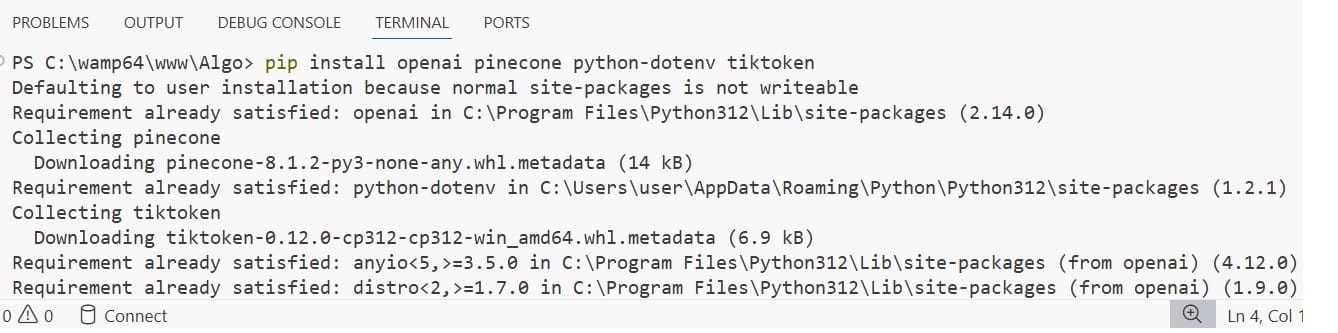
In simple terms:
openai→ generates embeddings from textpinecone→ stores and retrieves vector embeddingspython-dotenv→ manages API keys securely
🔐 Step 2: Create .env File
In most of my implementations, I avoid placing API keys directly in code. Instead, I keep them in a .env file like this:
OPENAI_API_KEY=your_openai_key
PINECONE_API_KEY=your_pinecone_key
PINECONE_INDEX=your_index_name
This approach keeps the project secure and closer to real-world production standards.
⚙️ Step 3: Load Environment in Python
import os
from dotenv import load_dotenv

load_dotenv(override=True)

openai_key = os.getenv("OPENAI_API_KEY")
pinecone_key = os.getenv("PINECONE_API_KEY")
index_name = os.getenv("PINECONE_INDEX")Code language: JavaScript (javascript)
This ensures all sensitive credentials are safely loaded into the application without exposing them in the codebase.
🧠 My Practical Insight
When I first started working with AI projects, I used to hardcode API keys directly into scripts, but I quickly realized it was risky and unprofessional. Moving to environment-based configuration made my workflow much more stable, secure, and aligned with how real production systems are built.
🚀 Why This Step Matters
A proper setup is not just about organizing code—it directly impacts:
- Stability of your application
- Ease of debugging
- Readiness for deployment
- Collaboration in real team environments
Once this foundation is correctly in place, building the semantic search pipeline with embeddings and Pinecone becomes much smoother and more reliable.
Step 2: Generate Embeddings Using OpenAI API
From the work I’ve done with semantic search systems, this step is where the real intelligence of the application begins. Up to this point, we only have plain text, but now we convert that text into embeddings, which is what allows machines to understand meaning Vector Database and Embeddings Python.
🧠 What is happening here?
In simple terms, I take a piece of text and send it to OpenAI. Instead of returning text, it returns a vector (a list of numbers) that represents the meaning of that sentence.
This is the foundation of semantic search.
⚙️ Embedding Function (Core Logic)
def get_embedding(text):
    response = client.embeddings.create(
        model="text-embedding-3-small",
        input=text
    )
    return response.data[0].embeddingCode language: JavaScript (javascript)
Simple Explanation
Here’s what this function does:
- I pass a sentence as input
- OpenAI processes the meaning behind it
- It returns a high-dimensional vector
- That vector represents the semantic meaning of the text
For example:
- Input: “Pinecone is a vector database”
- Output: A long list of numbers that captures the meaning of that sentence
My Practical Experience
When I first started experimenting with embeddings, it was interesting to see how two completely different sentences could still produce similar vectors if they shared the same meaning. That’s when I understood why semantic search is so powerful compared to keyword-based search.
Instead of matching words, the system now matches intent and context, which is exactly how modern AI applications behave.
Why This Step is Important
This step is critical because:
- It converts raw text into machine-understandable format
- It enables similarity search later in Pinecone
- It is the core intelligence layer of the entire system
Without embeddings, there is no semantic search—only traditional text matching.
Step 3: Create Pinecone Index and Store Vectors
From my experience building semantic search systems, this is the step where everything starts becoming practical. Until now, we only generated embeddings, but they are useless unless we store them properly inside a vector database like Pinecone.
This is where the system actually starts behaving like a real AI-powered search engine.
Step 3.1: Create Pinecone Index
if index_name not in [i["name"] for i in pc.list_indexes()]:
    pc.create_index(
        name=index_name,
        dimension=1536,
        metric="cosine",
        spec=ServerlessSpec(cloud="aws", region="us-east-1"),
    )Code language: JavaScript (javascript)
Simple Explanation
From what I’ve observed while working on AI projects, the index is basically the storage layer for all embeddings.
dimension=1536→ matches OpenAI embedding sizecosine→ measures similarity between meanings- Index → container that holds all vector data
If this setup is wrong, the search results will not work correctly later.
Step 3.2: Store Embeddings in Pinecone OpenAI Tutorial 2026
for i, doc in enumerate(docs):
    vector = get_embedding(doc)
    index.upsert([(f"doc-{i}", vector, {"text": doc})])Code language: JavaScript (javascript)
Simple Explanation
In simple words, this is what I am doing:
- Taking each text document
- Converting it into embeddings using OpenAI
- Uploading it into Pinecone with a unique ID
- Storing original text as metadata for later retrieval
This ensures that when I search later, I don’t just get vectors—I can also return readable results.
My Real Experience
When I first implemented this pipeline, I understood how powerful vector databases really are. Before this step, everything feels theoretical. But once data is stored in Pinecone, the system becomes fully functional and ready for semantic search.
Even if two sentences are completely different in wording, Pinecone can still connect them based on meaning.
Why This Step Matters
This step is important because:
- It activates the vector database layer
- It makes embeddings searchable
- It enables semantic similarity search
- It turns raw data into an AI-ready knowledge system
Real Example
If I store:
- “Python is used for AI development”
- “Pinecone stores vector embeddings”
And a user searches:
- “AI tools for knowledge storage”
The system can still return relevant results because it understands context, not just keywords.
Complete Code Pinecone Vector Database + OpenAI Works Together
What we discussed above in this post will now be implemented in a real practical coding example. In this project, I am using the Pinecone free trial version, and the OpenAI API key is not completely free. You need to pay a small amount to use the OpenAI API in real coding practice because, although we can create an API key for free, actual usage in Python applications is billed at a very low cost for processing requests.
For this project, I am using VS Code as my development environment. I created a new folder in the root directory—in my case, the folder name is Algo (you can name it anything you prefer). Inside this project, I created a .env file (environment file) and an ingest.py file.
In the .env file, we store our API keys securely instead of hardcoding them in the code. I have also added an image below for better understanding.
OPENAI_API_KEY=sk-proj-***************-1fWb0A
PINECONE_API_KEY=pcsk_4WppgA_77FtowQ********WWHw49z2cB7YVQTvUmbBg4yrSUNo
PINECONE_INDEX=rag-index

after that next open the python file (ingest.py ) and add the code complete and make sure the indent python set if you get any errors
Install Required Libraries first for that in vscode go to terminal and type or paste the below code
pip install openai pinecone python-dotenv tiktoken
import os
from dotenv import load_dotenv
from openai import OpenAI
from pinecone import Pinecone, ServerlessSpec

load_dotenv(override=True)
client = OpenAI(api_key=os.getenv("OPENAI_API_KEY"))
pc = Pinecone(api_key=os.getenv("PINECONE_API_KEY"))

index_name = os.getenv("PINECONE_INDEX")

if index_name not in [i["name"] for i in pc.list_indexes()]:

    pc.create_index(
        name=index_name,
        dimension=1536,
        metric="cosine",
        spec=ServerlessSpec(cloud="aws", region="us-east-1"),
    )
index = pc.Index(index_name)
docs = [
    "Python is a programming language used for AI and web development.",
    "Pinecone is a vector database used for storing embeddings.",
    "RAG stands for Retrieval Augmented Generation.",
    "AI chatbots can use vector databases to remember context.",
]
def get_embedding(text):
    response = client.embeddings.create(model="text-embedding-3-small", input=text)
    return response.data[0].embedding
for i, doc in enumerate(docs):
    vector = get_embedding(doc)
    index.upsert([(f"doc-{i}", vector, {"text": doc})])
print("✅ Data stored in Pinecone successfully!")
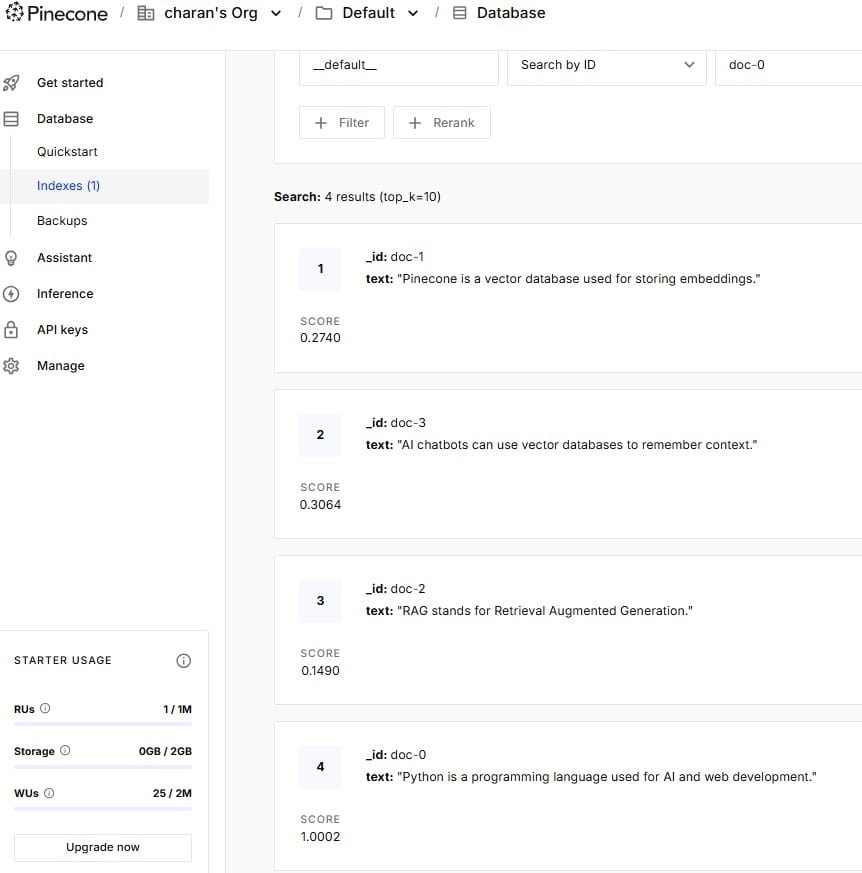
Final Output

You can see the above image, Data stored in Pinecone successfully! In Pinecone Vector Database and now its time to check in out Pinecone Vertical DB
Common Errors & How to Fix Them
From my experience building AI projects with OpenAI embeddings and Pinecone, I’ve noticed that most beginners don’t struggle with the concept—they struggle with small setup and configuration issues. These errors are normal, and once you understand them, debugging becomes much easier.
1. Incorrect API Key Error
One of the most common issues I’ve faced is authentication failure.

Problem:
- OpenAI or Pinecone API key not working
- “Unauthorized” or “Invalid API Key” error
Fix:
- Double-check
.envfile values - Ensure
load_dotenv()is called properly - Restart VS Code after updating environment variables
2. Pinecone Index Not Found
Problem:
- “Index does not exist” error when inserting vectors
Fix:
- Make sure index name in
.envmatches exactly - Confirm index is created before calling
index.upsert() - Print available indexes using
pc.list_indexes()
3. Dimension Mismatch Error
This is a very common issue when working with embeddings.
Problem:
- Pinecone expects
1536dimension but receives something else
Fix:
- Ensure you are using
text-embedding-3-small - Do not mix different embedding models
- Keep Pinecone index dimension consistent (1536)
4. Empty or Wrong Embedding Response
Problem:
- Embedding returns null or unexpected format
Fix:
- Check OpenAI API quota and billing status
- Ensure correct model name is used
- Print response before inserting into Pinecone
5. Environment Variables Not Loading
Problem:
os.getenv()returnsNone
Fix:
- Confirm
.envfile is in the correct directory - Use
load_dotenv(override=True) - Restart terminal or VS Code session
Conclusion
From my real experience building this semantic search project with OpenAI and Pinecone, I can say this is the point where everything starts making sense in a practical way. Earlier, concepts like semantic search, embeddings, and vector databases felt separate and a bit confusing. But once I connected OpenAI with Pinecone and ran the code, everything started coming together naturally.
I personally found it interesting how simple text gets converted into embeddings and then becomes a working search system that understands meaning instead of just matching exact words. Even small queries started returning relevant and intelligent results, which felt very close to real AI applications.
While working on this, I also faced a few errors in the beginning—like API key issues, index not found errors, and embedding dimension mismatches. But once I fixed those setup problems, the entire system started working smoothly.
For me, this project is not just a tutorial—it feels like a real step toward building production-level AI systems that can be used in real-world applications.
F.A.Q
1. What is semantic search in simple words?
Semantic search is a way of searching data based on meaning instead of exact keywords. In my projects, I use embeddings to convert text into vectors so the system can understand context and return more relevant results.
2. Why do we use Pinecone instead of a normal database?
From my experience, normal databases are not designed for similarity search. Pinecone is built specifically for vector storage and fast similarity matching, which makes it perfect for AI-powered search systems.
3. Is OpenAI API free for embeddings?
You can create an OpenAI API key for free, but in my experience, real usage in Python projects is paid based on usage. The cost is usually small, but you need billing enabled to run embeddings in real applications.
4. What is the use of embeddings in this project?
Embeddings convert text into numerical vectors that represent meaning. From what I’ve seen in practice, this is the core part that allows semantic search to understand user intent instead of just matching words.
5. Can beginners build this Pinecone and OpenAI project?
Yes, absolutely. In my experience, even beginners can build this project if they follow step-by-step instructions. It is actually a great starting point for learning AI Engineer, Data Engineer, or AI Data Analyst skills because it teaches real-world implementation.