

Related article , 250 Data Engineer & AI Interview Questions – Free PDF Download (2026)
Introduction to Python Vector Databases and Embeddings
In my experience working with AI-based search systems, I have noticed a major shift from traditional databases to vector-based systems. When I first started exploring Python Vector Database Embeddings, I realized how different they are compared to normal data storage approaches.
If you are building skills in vector databases, embeddings, and AI development using Python, these concepts directly connect to real job opportunities. You can also check this AI Jobs Python SQL Excel Career Roadmap to understand where these skills can take you in the AI industry.
In a normal database, I usually store structured data like numbers, text, or JSON records, and I retrieve them using exact matches or SQL queries. But in modern AI applications, this approach is not enough. For example, if I search for a phrase like “AI laptop,” a traditional database will only return results that exactly match those words.
However, with a vector database, my approach changes completely. Instead of storing raw text, I convert data into embeddings using models. These embeddings capture the meaning of the data, not just the words. This is where Beginner’s Guide to Python Embeddings becomes very important for anyone entering this field.
From my knowledge, vector databases allow semantic search. That means even if the query is slightly different, the system can still understand the intent and return relevant results. This is something I could never achieve efficiently with a traditional relational database.
When I compare both systems, I see that normal databases are great for structured queries and transactions, but vector databases are powerful for AI-driven applications like recommendation systems, chatbots, and semantic search engines. This is exactly why Step-by-Step Vector Database Python implementations are becoming so important in 2026.
In this tutorial, I will guide you through how I personally build a vector database using Python embeddings, so you can understand how modern AI systems store and retrieve information in a much smarter way.
Normal Database vs Vector Database (AI & Python Embeddings Comparison)
While traditional databases rely on SQL queries for structured data, modern AI systems are moving beyond this approach. If you want to explore how AI can also convert natural language into SQL queries, check this Convert English to SQL Using AI Python PostgreSQL tutorial.
From my experience working with Python Vector Database Embeddings, I have realized that understanding the difference between traditional databases and vector databases is very important for anyone learning AI in 2026.
| Feature | Normal Database (PostgreSQL, MySQL, SQL Server) | Vector Database (AI Embeddings Based) |
|---|---|---|
| Data Type | Structured data like tables, rows, JSON, numbers, and text | High-dimensional vectors created from embeddings |
| Search Method | Exact match using SQL queries (WHERE, JOIN, LIKE) | Semantic search using similarity (cosine, dot product) |
| Understanding Data | Does not understand meaning, only matches keywords | Understands meaning using embeddings (AI-powered context) |
| AI Capability | Limited AI support, mostly rule-based queries | Built for AI applications like RAG, chatbots, and semantic search |
| Performance Use Case | Best for financial data, user records, transactions | Best for AI search engines, recommendation systems, LLM apps |
| Query Example | SELECT * FROM products WHERE name = ‘laptop’ | “Find similar laptops for gaming and AI work” (semantic query) |
| My Experience Insight | In my experience, traditional databases are still essential for structured systems | But I found vector databases far more powerful for AI-driven search and embeddings |
From my knowledge, this shift from traditional databases like PostgreSQL, MySQL, and SQL Server to vector databases is one of the biggest transformations in modern AI systems. This is exactly why Step-by-Step Vector Database Python tutorials are becoming so important for beginners.
When I compare both systems, I clearly see that normal databases are still necessary for structured business data, but vector databases are the future of AI search, semantic understanding, and embedding-based retrieval systems.
What is a Vector Database and Why It Is in High Demand in 2026
While working on AI-based search applications, I quickly realized that traditional databases alone are not sufficient for modern intelligent systems. A vector database is built to store data as vectors, which are numerical representations generated using machine learning models called embeddings.
Conventional databases like PostgreSQL, MySQL, and SQL Server are designed for structured data such as rows, columns, and predefined schemas. They perform very well when exact matches or rule-based queries are required. However, in AI systems, I found that understanding meaning is far more important than matching exact words. This is where Python Vector Database Embeddings become critical.
As I went deeper into Beginner’s Guide to Python Embeddings, I learned that embeddings transform unstructured data such as text, images, and audio into high-dimensional vectors. These vectors help machines understand context and similarity rather than just keywords.
From what I’ve observed in real-world AI projects, vector databases enable semantic search. This means that even if a user query does not exactly match the stored data, the system can still return highly relevant results based on meaning.
For example, a search like “AI laptop for coding” may also return results such as “machine learning developer laptop” because the intent is similar.
This is one of the key reasons vector databases are gaining massive importance in 2026. With the rapid growth of AI applications such as chatbots, recommendation systems, and Retrieval-Augmented Generation (RAG) pipelines, there is a strong need for intelligent search systems that go beyond simple keyword matching.
When I compare both approaches, I clearly see that traditional databases are still essential for structured business operations, but vector databases are becoming the backbone of modern AI-powered search and recommendation systems. This is why learning Step-by-Step Vector Database Python has become an essential skill for developers entering the AI space today.
Vector Database with AI: How Embeddings Power Modern Search Systems
As I worked more on AI-driven applications, I started noticing that the real power behind modern search systems is not just the model itself, but how data is stored and retrieved efficiently. This is where vector databases combined with AI embeddings play a major role.
In traditional search systems, results are usually based on keyword matching. However, I found that this approach often fails when users phrase the same idea differently. For example, a search for “best laptop for AI development” may not return results like “machine learning workstation” in a normal database. This limitation led me to explore Python Vector Database Embeddings as a better alternative.
Vector databases work closely with AI models by storing embeddings, which are numerical representations of data. When I learned more through the Beginner’s Guide to Python Embeddings, I understood that embeddings capture the meaning and context of data instead of just the words themselves.
From my experience building small AI search prototypes, I’ve seen how embeddings transform search accuracy. When a user query is converted into a vector, the system compares it with stored vectors and finds the most similar meaning instead of exact text matches. This is what makes semantic search so powerful in modern AI systems.
This combination of AI + vector databases is now widely used in applications like chatbots, recommendation engines, and Retrieval-Augmented Generation (RAG) systems. It allows developers to build intelligent search experiences that feel much more human-like.
This is also why learning Step-by-Step Vector Database Python has become an important skill for anyone building AI applications in 2026, because it directly impacts how efficiently AI systems understand and retrieve information.
Example Dataset: Understanding Raw JSON Data for Embeddings
For this project i’ve created a root folder in VSCode and the folder name is Vector-Database and in this folder i have created 2 files one data.json file contains some data and 2nd file is create_vector_db.py python file..
This code converts raw JSON data into a vector database for AI semantic search using Python and embeddings.
When I started building my first vector database project, I created a simple dataset in VS Code named data.json. This file contains basic text entries that I later converted into embeddings using Python and SentenceTransformer. This is an important step in Python Vector Database Embeddings because raw text cannot be directly used for semantic search unless it is first transformed into numerical vectors.
Here is the simple JSON data I used just copy and paste in your application and also iam sharing an image
[
  {"id": 1, "text": "Python is used for AI and web development"},
  {"id": 2, "text": "Machine learning is part of artificial intelligence"},
  {"id": 3, "text": "Databases store and manage structured data"},
  {"id": 4, "text": "SQL is used to query relational databases"},
  {"id": 5, "text": "Vector databases store embeddings for AI search"}
]
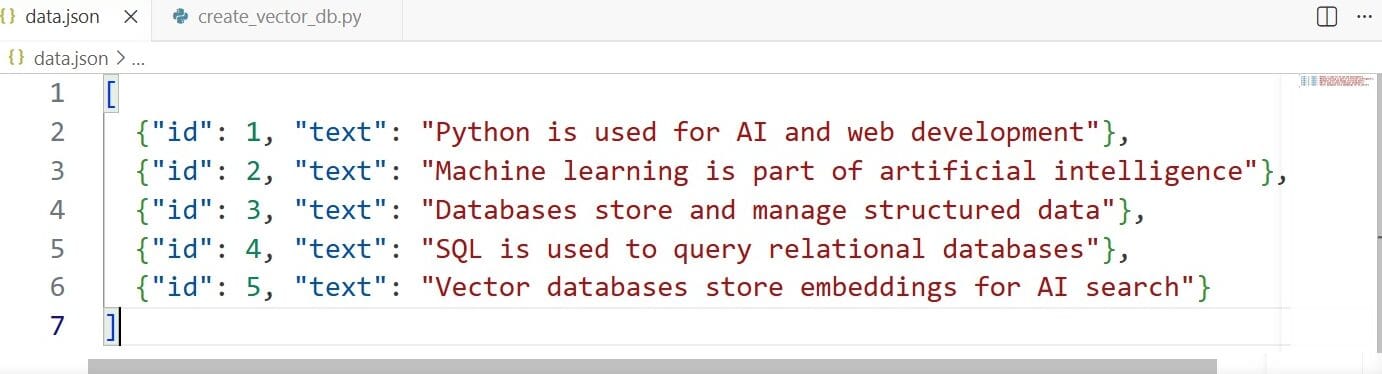
From my understanding, this data is just plain text, and traditional databases can store it easily but cannot understand its meaning. That is why embeddings are required. When I use SentenceTransformer in Python, each sentence is converted into a numerical vector that represents its meaning in a high-dimensional space. This allows the system to compare sentences based on similarity rather than exact keywords.
For example, sentences related to AI and machine learning will have closer embeddings compared to unrelated topics like SQL or databases. This is what makes vector databases powerful for modern AI search systems.
This is my first vector database project, and I am sharing everything I have learned through this blog in a simple and beginner-friendly way. My goal is to help others understand Step-by-Step Vector Database Python without confusion.
I will continue sharing more tutorials as I build advanced projects, and you can also follow my latest SQL + AI content to stay updated with modern data engineering and AI concepts.
Using SentenceTransformer for Python Embeddings
After preparing my dataset, the next step in building my first vector database was converting text into embeddings. For this, I used the SentenceTransformer library in Python, which is one of the easiest and most popular tools for generating embeddings in Python Vector Database Embeddings projects.
When I first learned this, I realized that SentenceTransformer takes simple text and converts it into numerical vectors. These vectors represent the meaning of the text, not just the words. This is very important for semantic search and modern AI applications.
To start, I installed the library using pip:
pip install sentence-transformers
Why we use pip install sentence-transformers
When you write: pip install sentence-transformers
you are not writing Python code. You are telling Python:
👉 “Download and install a library so I can use it in my project.”
⚙️ Simple explanation
💡 Think like this:
- Python = your kitchen
- Libraries (sentence-transformers) = cooking tools
- pip = delivery service
So, pip install sentence-transformers = “Bring the SentenceTransformer tool into my kitchen (Python) so I can use it.”
🚀 Why we need SentenceTransformer
In your project, you want to convert text into embeddings:
Example: “Python is used for AI”
Machine cannot understand this directly. So SentenceTransformer does this:
👉 Text → Numbers (vector embedding)
Example output: [0.12, -0.33, 0.88, …]
These numbers help AI understand:
- meaning
- similarity
- context
🧠 Why pip is required
Because:
- Python does NOT have SentenceTransformer built-in
- It is an external AI library
- You must install it first before using it in code
Step-by-Step Vector Database Python Implementation
In this section, I am sharing my first practical implementation of a vector database using Python. This is a key part of Python Vector Database Embeddings because here we convert raw text data into embeddings and store them in a structured format that can later be used for semantic search.
When I built this, my goal was simple — take a JSON file and transform it into a basic vector database using the SentenceTransformer model. This is one of the most important steps in the Beginner’s Guide to Python Embeddings because it shows how AI actually understands text in real applications.
🧠 Python Code: Converting Text into Vector Database
import json
from sentence_transformers import SentenceTransformer
model = SentenceTransformer("all-MiniLM-L6-v2")
with open("data.json", "r") as f:
    data = json.load(f)
print("Converting text into vectors...")
for item in data:
    text = item["text"]
    vector = model.encode(text)
    item["embedding"] = vector.tolist()  # convert numpy array → list
with open("vector_db.json", "w") as f:
    json.dump(data, f, indent=2)
print("Vector database created successfully!")
⚙️ Simple Explanation (What is happening here)
From my experience building this project, I can say this is the moment where normal data becomes “AI-understandable data”.
🔹 Step 1: Loading data
First, I load the JSON file that contains simple text sentences. This is our raw dataset, which cannot be used for AI search directly.
🔹 Step 2: Converting text into embeddings
Here I use the SentenceTransformer model (all-MiniLM-L6-v2) to convert each sentence into a vector (list of numbers). These vectors represent the meaning of the text, not the exact words.
This is the most important part of Step-by-Step Vector Database Python because embeddings allow machines to understand similarity between sentences.
🔹 Step 3: Creating vector database
Finally, I store these embeddings back into a new file called vector_db.json. Now each record contains both:
- original text
- vector embedding
This is my first simple vector database, built from scratch using Python.
🚀 Why this is powerful for AI in 2026
From what I have learned, this approach is the foundation of modern AI systems like:
- semantic search engines
- AI chatbots
- recommendation systems
- RAG (Retrieval-Augmented Generation) pipelines
Instead of keyword matching like traditional databases, this system understands meaning and context, which is why Python Vector Database Embeddings are becoming so important.
💡 Final Insight
This was my first hands-on experience building a vector database, and I am sharing it so beginners can clearly understand how embeddings work in real projects. I will continue posting more tutorials as I improve this system step-by-step and explore advanced vector search techniques.
Final Output: Semantic Search in Action
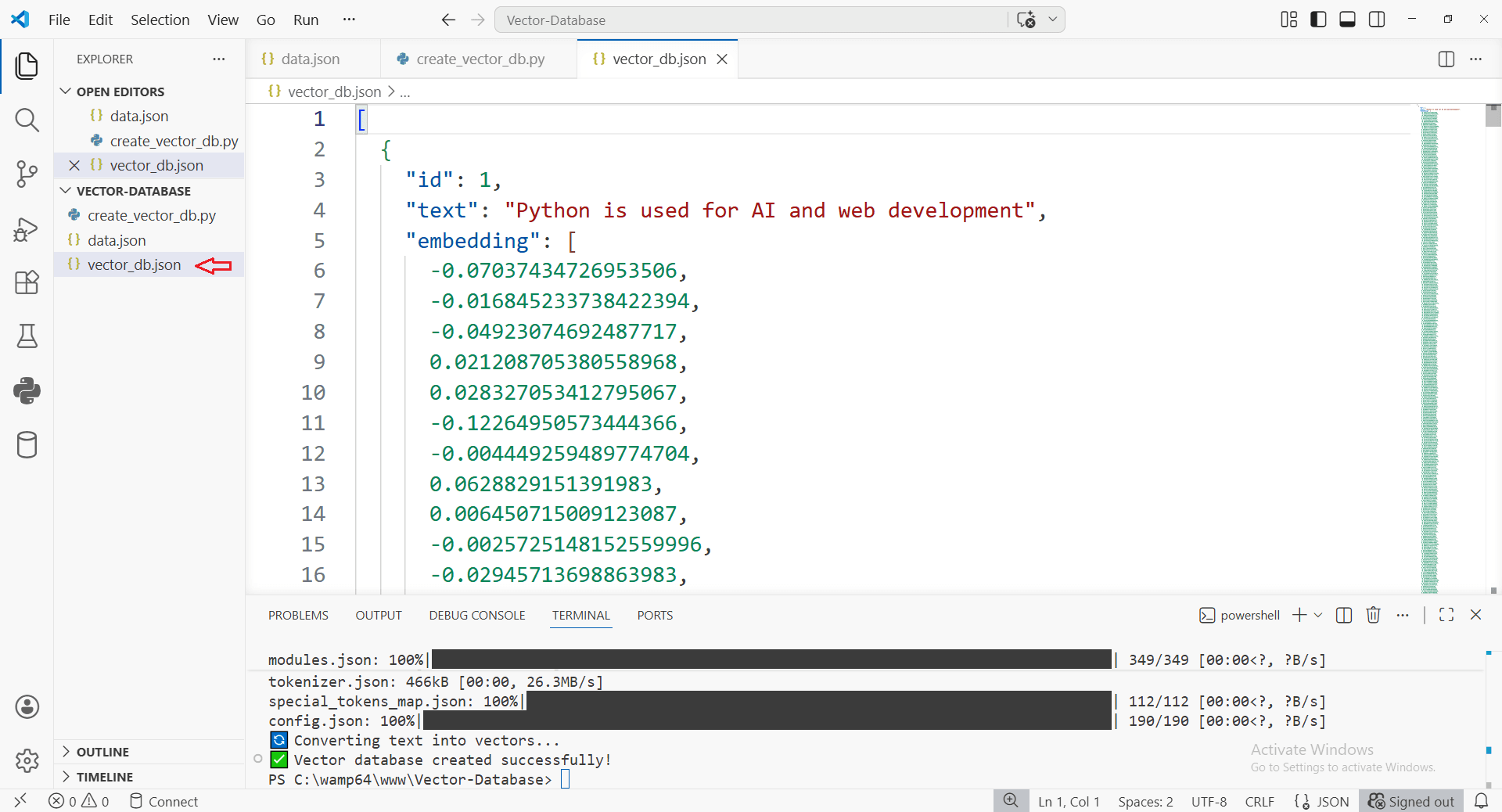
After Excecution (python create_vector_db.py) the new file vector_db.json file has been created with a vector database embeddings. you can see the image the embedding are created
Common Errors and How to Fix Them in Vector DB Implementation
While building my first Python Vector Database Embeddings project, I faced several small but important errors. These mistakes are very common for beginners, especially when working with SentenceTransformer and JSON-based vector storage. In this section, I will share the issues I personally faced and how I fixed them in a simple way. 7 Critical RAG Production Pitfalls (Python Fixes)
❌ 1. ModuleNotFoundError: sentence_transformers
One of the first errors I got was that Python could not find the SentenceTransformer library.
💡 Why it happens:
The library is not installed in your environment.
✅ Fix:
Install it using pip:
pip install sentence-transformers
❌ 2. FileNotFoundError: data.json
💡 Why it happens:
Python cannot find your JSON file.
✅ Fix:
Make sure:
data.jsonis in the same folder as your Python file- File name is spelled correctly
❌ 3. TypeError: Object of type ndarray is not JSON serializable
💡 Why it happens:
Embeddings from SentenceTransformer are NumPy arrays, and JSON cannot store them directly.
✅ Fix:
Convert embeddings to list:
vector.tolist()
This is an important step in Step-by-Step Vector Database Python implementation.
❌ 4. Slow embedding generation
💡 Why it happens:
Processing one sentence at a time instead of batch processing.
✅ Fix:
Use batch encoding:
embeddings = model.encode(text)
This improves performance in Python Vector Database Embeddings projects.
❌ 5. Incorrect similarity search results
💡 Why it happens:
Using wrong similarity method or not normalizing vectors.
✅ Fix:
Use cosine similarity or proper vector search libraries like FAISS for better accuracy.
🚀 Final Insight
These errors are part of the learning process when building your first vector database. Once you fix them, you get a clear understanding of how AI systems convert raw data into embeddings and use them for semantic search.
This is a key milestone in learning Beginner’s Guide to Python Embeddings and building real-world AI applications.
Conclusion
Building my first vector database using Python was a very important learning step in my journey with AI. From working with simple JSON data to converting it into embeddings using SentenceTransformer, I clearly understood how modern AI systems move beyond traditional keyword-based search.
Through this Python Vector Database Embeddings project, I learned that raw data alone is not useful for intelligent applications. It must first be converted into meaningful vectors so that machines can understand context and similarity. This is exactly what makes vector databases more powerful compared to normal databases like PostgreSQL, MySQL, and SQL Server.
From my experience, this Beginner’s Guide to Python Embeddings project helped me understand the core foundation of semantic search. Instead of matching exact words, the system now understands meaning, which is the key idea behind modern AI applications like chatbots, recommendation systems, and Retrieval-Augmented Generation (RAG) pipelines.
This is just the beginning of my learning journey. I will continue improving this project and sharing more tutorials as I explore advanced concepts in Step-by-Step Vector Database Python development. My goal is to explain these topics in a simple way so that beginners can easily understand and build their own AI-powered systems.
After learning how to build a vector database using Python embeddings, the next important step is to test your understanding through practice. You can try this
Python AI Mock Interview Quiz Practice to strengthen your concepts and prepare for real AI development interviews.
In short, this project shows how we can transform simple data into intelligent search systems using Python and embeddings, which is one of the most important skills for AI development in 2026.
F.A.Q (Frequently Asked Questions)
What is a vector database in simple terms?
A vector database is a special type of database that stores data as embeddings (numbers) so that AI systems can understand meaning and perform semantic search instead of exact keyword matching.
Why are vector databases important in 2026?
Vector databases are important in 2026 because AI applications like chatbots, recommendation systems, and RAG pipelines need semantic search, which traditional databases cannot efficiently handle.
What is SentenceTransformer used for in Python?
SentenceTransformer is used to convert text into embeddings (numerical vectors). These embeddings help AI systems understand the meaning and similarity between sentences.
What is the difference between normal database and vector database?
Normal databases store structured data and work with exact keyword matching, while vector databases store embeddings and support semantic search based on meaning and context.
Can I build a vector database using Python?
Yes, you can easily build a basic vector database using Python by converting text into embeddings using SentenceTransformer and storing them in formats like JSON, FAISS, or ChromaDB.
What are embeddings in AI?
Embeddings are numerical representations of text, images, or audio that capture meaning. They allow AI systems to compare similarity between different pieces of data.
Is vector database useful for beginners in AI?
Yes, learning vector databases is very useful for beginners because it builds the foundation for modern AI systems like semantic search, chatbots, and AI recommendation engines.
What projects can I build using vector databases?
You can build semantic search engines, AI chatbots, document search systems, recommendation systems, and Retrieval-Augmented Generation (RAG) applications using vector databases.