

Introduction
In my previous blog posts, I’ve showedPython Gemini API: Build Your Own Free AI ChatGPT (2026) from Google AI Studio, but this time I want to try a ChatGPT like voice assistant in Python like a Google Assistant or Apple voice assistant Siri, but when I tried to create with free AI API key, my bad luck no more credits left, free trial period is over.
So, I used in this blog post a paid version (small fees) of OpenAI API key. Before continue the tutorial. you can learn using openai How to Save Chatbot Conversations to a Text File in Python 2026. Now, let’s contine our blog post of voice ai assistant
Project Overview
When I started to build this project, my goal was simple — I wanted to create a ChatGPT like voice assistant in Python that could actually respond to my voice in real time.So this project does exactly that. It records my voice using the microphone, converts that speech into text, sends it to an AI model, and then prints the response instantly.
It’s a simple pipeline, but getting all parts to work together smoothly took some trial and error, like microphone not working properly, library installation issues for Python, and speech recognition.
Workflow behind the project is: First, the microphone records my voice when I speak, and the recorded sound is stored temporarily as audio. After that, the audio is converted into text using speech recognition. Then, the text is sent to the OpenAI API for processing, AI generates the response, and prints the output.
Voice → Audio → Text → AI → Response
Prerequisites & Setup to create ChatGPT like voice assistant in Python
Before starting this create a ai voice assistant in Python, I installed all the necessary software and hardware on my system. Trust me, skipping this part will only give you errors later 😅
What You Need
- Python installed (I used Python 3.12.0)
- A working microphone
- A proper Stable internet connection
- An OpenAI API key (paid version) check my youtube ai code with haritha how to create an openai apikey
Install Libraries & API Setup
Install Required Libraries
Run this command in your terminal: in my case iam using visual studio code open your project and in the root folder add the below code
pip install sounddevice wave SpeechRecognition openai python-dotenv
pip install sounddevice wave SpeechRecognition openai python-dotenv
⚠️ Common Issue I Faced
At first, my microphone didn’t work because I missed one important library.
👉 If you face issues, install this:
pip install pyaudio
🔑 Setup OpenAI API Key
Create a .env file in your project folder and add check the image below
OPENAI_API_KEY=<your_api_key_here>

💡 Small Tip (From My Experience)
I wasted time debugging errors that were just missing libraries or wrong API key. So double-check everything before running the code.
Python Code & How It Works
Below you can find the complete code, and explanation of the code will given below
import sounddevice as sd
import wave
import speech_recognition as sr
from openai import OpenAI
import os
from dotenv import load_dotenv

# 🔐 Load API key and override is True, which overrides your previous openaikey
load_dotenv(override=True)
client = OpenAI(api_key=os.getenv("OPENAI_API_KEY"))

#  Record voice for only(5 seconds)
print(" Speak now...")

fs = 44100
audio = sd.rec(int(5 * fs), samplerate=fs, channels=1, dtype="int16")
sd.wait()

# Save your audio
with wave.open("voice.wav", "wb") as f:
    f.setnchannels(1)
    f.setsampwidth(2)
    f.setframerate(fs)
    f.writeframes(audio.tobytes())

# this steps its converts speech to text
r = sr.Recognizer()

with sr.AudioFile("voice.wav") as source:
    data = r.record(source)

try:
    text = r.recognize_google(data)
    print("You:", text)

    # Text Send to OpenAI
    response = client.chat.completions.create(
        model="gpt-4o-mini", messages=[{"role": "user", "content": text}]
    )

    print("AI Chatbot:", response.choices[0].message.content)

except Exception as e:
    print("❌ Error:", e)
Run, Debug & Improve Common Errors I Faced While Building This Voice Assistant
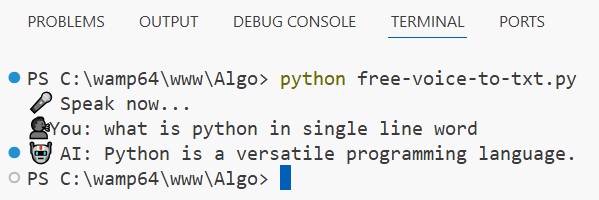
Final Output of this code. After executing the program, I asked “what is python in single line word” using my mic, and my voice converts into text and displays on the terminal. You can see in the image, and got the output and got response from AI Python is a versatile programming language.
Complete Video Tutorial Build AI Chatbot with Speech Recognition
While building this project, I didn’t get everything working on the first try. In fact, I faced multiple issues, especially with audio recording and API responses. Here are some common errors I personally encountered and how I fixed them.
❌ 1. Microphone Not Working
At first, my code was running but not recording any audio. This was frustrating.
- ✔ Make sure your microphone permissions are enabled
- ✔ Check system sound settings
- ✔ Try running Python as administrator
❌ 2. Speech Recognition Not Working
Sometimes I got errors like “Could not understand audio”.
- ✔ Speak clearly and slowly
- ✔ Avoid background noise
- ✔ Increase recording time if needed
❌ 3. OpenAI API Key Error
I also faced API errors due to incorrect key setup.
- ✔ Make sure your
.envfile is correct - ✔ Restart the script after updating the API key
- ✔ Ensure
load_dotenv()is called properly
❌ 4. Module Not Found Error
Sometimes Python couldn’t find installed libraries.
- ✔ Run
pip install sounddevice SpeechRecognition openai python-dotenv - ✔ Check your Python environment
❌ 5. No Response from AI
In some cases, the assistant returned no output.
- ✔ Check if speech-to-text returned empty input
- ✔ Print the recognized text before sending to AI
FAQs
1. Why is my ChatGPT like voice assistant in Python not recording my voice?
When I first tried building this ChatGPT like voice assistant in Python, my microphone didn’t work at all. Most of the time, this happens because the system is not detecting the correct input device or permissions are not enabled. Make sure your microphone is properly connected and selected in your system settings.
2. Why is speech recognition not working in my Python voice assistant?
In this ChatGPT like voice assistant in Python project, speech recognition sometimes failed to convert my voice into text. This usually happens because of background noise, unclear speech, or internet issues. Try speaking clearly and reduce noise for better accuracy.
3. Why am I getting errors with OpenAI API in my voice assistant?
While building this ChatGPT like voice assistant in Python using OpenAI API, I faced errors when my API key was invalid or my free trial was over. Make sure your API key is correct in the .env file and your billing is active.
4. Why is my AI voice assistant response slow?
In this ChatGPT like voice assistant in Python, the response is not fully real-time because it records audio first, then processes it, and finally sends it to the AI model. This takes a few seconds, so a small delay is normal.
5. How can I improve my ChatGPT like voice assistant in Python AI project?
From my experience, you can improve this ChatGPT like voice assistant in Python by adding voice output (text-to-speech), continuous listening instead of fixed recording time, and memory for conversations. These small upgrades can make your assistant feel more like a real Google Assistant or Siri.
💡 Small Quick Tip
I kept these FAQs based on real problems I faced while building this project, so if you run into the same issues, don’t worry — it’s completely normal 😅