
Python Gemini API: Build Your Own Free AI ChatGPT (2026)
Introduction to Free AI Build chatbot using Gemini API
I still remember the first time I tried building a chatbot without AI — endless backend scripts. That was a nightmare. Input handling, debugging late into the night… I thought, “There has to be a better way!” Back then, I ended up building that project with Python and Django web applications, creating a basic chatbot that could answer simple questions for my coding experiments. It worked, but it took hours of coding and tweaking just to handle one scenario.
Fast forward to today, and the world looks completely different. Tools like ChatGPT, GitHub Copilot, and Google’s Gemini API have completely changed how developers build AI chatbots. What used to take a week can now be spun up in an afternoon. Isn’t it wild how fast things have evolved?
What excites me the most is how interactive AI feels almost magical. You type a prompt, and the system responds in real time. It’s not just automation anymore — it’s like having a co‑developer who understands context, responds intelligently, and helps you prototype faster than ever.
Of course, the trick isn’t just “calling an API.” The real skill lies in crafting prompts, controlling responses, and integrating AI into real projects. That’s where the Gemini API truly shines. Unlike many paid options I’ve used Openai api in my blog post checkout my latest ai tools tutorials — Gemini provides a free, easy way to experiment and build your own ChatGPT-style chatbot without worrying about costs.
n this guide, I’ll walk you through a step-by-step Python AI project to build a chatbot using the Gemini API. By the end, you’ll have a fully working bot capable of handling real user inputs, and you’ll understand how to make AI work for you — not just with you. Ready? Let’s dive in!
Requirements to Build Your Free AI ChatGPT
Before building the Free AI Chatbot Like ChatGPT tutorial, make sure you have the following installed in your IDE (in this tutorial iam using Visual Studio Code (VSCODE) :
- Python 3.9 or later
- Visual Studio Code (or any Python IDE)
- A free API key from Google AI Studio
- Internet connection
Step-by-Step Tutorial: Create a Free AI Chatbot Chatgpt in Python
Let’s create Step-by-step Python AI project, practical tutorial with Google Gemini AI Python chatbot like ChatGPT. First, let’s open the Gemini AI Studio API to create a secret API key. For that, you need to log in with your valid Gmail account.Here is the link to visit AI Studio google
Now, after logging in successfully, in the left-side panel called Gemini AI Studio, at the bottom, you can find a ‘Get API Key’ option; click on it. It will direct to the API key page.
Here, we can create a new free API key by clicking the button at the top of the page labelled “Create API Key” with a key symbol. Click that one. Give the name of the key or leave it with the default name “Gemini API Key”. Iam using the default name only and also Check it out if you’re interested, here’s how you can save chatbot conversations to a file in Python.

If you want to explore more AI projects, learn more in our Python AI tutorial.
Install Required Libraries
Open Visual Studio Code. In the terminal, add the snippet below. To run the code smoothly, you need to install the necessary libraries.
pip install google-genai python-dotenvThese packages must be installed to allow Python to connect securely with the Google Gemini API.
Secure Your Gemini API Key Using .env File
Here, one more important step to secure your apikey , don't add your secret API key directly into your Python code. Always create a separate file called .env (without any file name, only the extension), and both ".py" and ".env" files must be in the same folder and in the .env file, the code is without any single or double codes. load_dotenv() reads the api key which loads the environment from a .env file.
So, we can access our secret API key securely in our project using a header package called load_dotev with an import statement
Note: A .env file is an environment file used to keep sensitive data—such as usernames, passwords, database connection strings, and API keys—secure. For more details, see this guide: How To Secure PostgreSQL Connection String In Python (pgAdmin 4) in .env file.
So, first create two files in visual studio code (.env, free-api.py) file
Below code for .env file
GEMINI_API_KEY=YOUR-SECRET-KEYWrite Python Code for free ai chatbot chatgpt
Python Code (free-api.py) :
from google import genai
from dotenv import load_dotenv
import os

load_dotenv()
client= genai.Client(api_key=os.getenv("GEMINI_API_KEY"))

while True:
    user_input=input("You :")
    if user_input.lower() == "exit":
        break
    response = client.models.generate_content(model="gemini-2.5-flash", contents=user_input)
    print(" chatbot :", response.text)
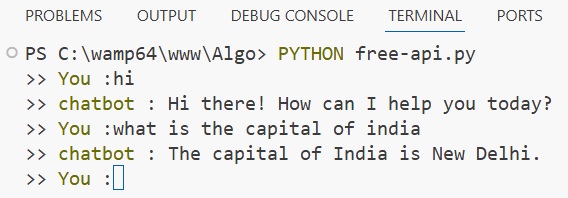
Below, is the output
PS C:\wamp64\www\Algo> PYTHON free-api.py
You :hi
chatbot : Hi there! How can I help you today?
You :what is the capital of india
chatbot : The capital of India is New Delhi.
You :
Check Out Complete Video tutorial Free Create AI chatbot in Python step by step
How the Python Gemini AI Chatbot Works
The chatbot works when run the above .py code. It prompts the user You: when the user enters any kind of necessary message then that message python sends to the Gemini API and gemini generated a response according to the user prompts. so, technically how this build ai chatbot with python code works
This Python script creates a simple AI chatbot using the Google Gemini API. First, it imports required modules and loads environment variables using python-dotenv, which securely stores the API key in a .env file. The genai.Client is then initialized with the GEMINI_API_KEY to authenticate requests. Inside the while True loop, the program continuously asks the user for input. If the user types “exit”, the loop stops. Otherwise, the input is sent to the Gemini model (gemini-2.5-flash) using generate_content(). The AI processes the prompt and returns a response, which is printed in the terminal as the chatbot’s reply.
Note: No AI chatbot gives 100% correct answer, so be careful while using the responses
Python OpenAI Image Generation Tutorial in 5 Steps
Frequently Asked Questions (FAQ)
1) How can you store securely an API key in a Python AI application? explain in short
In a Python AI project, the API key should not be written directly added in the code. Instead, developers usually store it in a .env file and load it using the python-dotenv package. This method keeps the API key secure and prevents it from being exposed when sharing the project or uploading to a servers or repository..
2) How does a Python chatbot communicate with the Gemini AI model?
A Python chatbot communicates with the AI model through the Gemini API. The application sends user prompts to the model using functions like generate_content(). The Gemini model processes the prompt and returns an AI-generated response, which is then displayed to the user.
client.models.generate_content(model="gemini-2.5-flash", contents=user_input)
3) What is the purpose of using the load_dotenv() function in a Python project?
The load_dotenv() function loads environment variables from a .env file into the application. This allows developers to store sensitive information such as API keys securely outside the main code. Using environment variables improves security and prevents exposing secrets when sharing the project. below with an example
load_dotenv() client= genai.Client(api_key=os.getenv("GEMINI_API_KEY"))
Conclusion: Build Your Own Free AI ChatGPT with Python Gemini API
Conclusion: Building a Gemini AI chatbot with Python is a great way to learn how modern AI applications work. With just a few lines of code, developers can create interactive AI chatbots similar to ChatGPT Which we created. This project can be extended further by adding a web interface, storing conversation history, or integrating the chatbot into websites.