

Alternatively, use the GUI by right-clicking Tables > Create, then toggling Primary Key in the Columns tab.
While you can use the pgAdmin 4 GUI to click through menus and toggle the “Primary Key” switch, real developers rarely do. We use the Query Tool because SQL scripts can be saved, shared, and pushed to version control.
Here is the exact example syntax we use in production:
SQL
CREATE TABLE users (
    user_id SERIAL PRIMARY KEY,
    username VARCHAR(100)
);
The Magic of SERIAL: Never manage IDs manually. The SERIAL keyword tells PostgreSQL to handle the math, automatically generating a unique, auto-incrementing integer every time you insert a row.
- The Naming Trap: Notice I named it
user_idand not justid? When your app grows and you are writing complexJOINqueries across five different tables, having five columns all namedidis a debugging nightmare. Always prefix your primary keys!
Introduction
Creating Table With Primary Key is one of the first and most essential skills every developer or data professional should master. In this step-by-step tutorial, I’ll walk you through 2 methods of creating tables, adding primary key constraints, and managing your database efficiently using pgAdmin 4.
PostgreSQL is one of the most popular and in-demand databases today, thanks to its powerful SQL features and growing integration with SQL AI-driven tools. From my experience, mastering these fundamentals — like table design and primary keys — lays a strong foundation for advancing your career in data engineering, backend development, and AI-powered applications. Once you understand the basics, it becomes much easier to tackle real-world projects and truly stand out as a developer in today’s competitive market.
How to create a table with primary key
In order to store any kind of data in PostgreSQL, we need a properly designed table. A table is not just a simple container — it has to follow certain rules to keep your data organized and reliable. These rules include defining data types for each column, applying constraints such as primary keys, foreign keys, and unique constraints and many more.. and using SQL keywords correctly so PostgreSQL can understand your commands without errors.
From my experience, understanding these constraints is essential for building robust databases:
- Primary Key: Uniquely identifies each row in a table. Every table should have one primary key to prevent duplicate records.
- Foreign Key: Ensures that a column in one table matches a column in another table. This helps maintain relationships between tables and keeps your data consistent.
- Unique Constraint: Ensures that a column (or combination of columns) contains only unique values. Unlike the primary key, a table can have multiple unique constraints.
Once you master these constraints, your tables will be structured properly, prevent errors like duplicate or invalid data, and provide a strong foundation for advanced SQL concepts and AI-driven applications. In my experience, learning these basics first makes it much easier to scale into real-world projects confidently. I will explain in 2 methods
Method 1: Using SQL in pgAdmin 4
In this method, I’ll show you how to create a table in PostgreSQL using SQL commands inside pgAdmin 4. Using SQL gives you full control over your table structure, including primary keys, foreign keys, and unique constraints.
Step 1: Open Query Tool
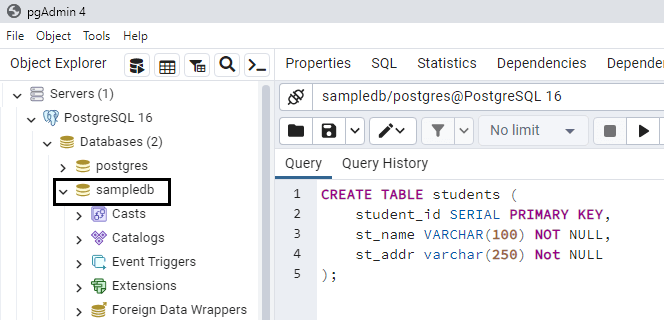
First, open pgAdmin 4, select your database, and click on Tables → Query Tool. This is where we will write our SQL commands. In my case my database is sampledb and go to the table section right click select query tool and below notice iam Creating Table With Primary Key
Step 2: Write the CREATE TABLE Command
Here’s a simple example How to create a table with primary key (table name is student) with different constraints and also check my syntax of the in the postgresql
CREATE TABLE students (
    student_id SERIAL PRIMARY KEY,
    st_name VARCHAR(100) NOT NULL,
    st_addr varchar(250) Not NULL
);
Step 3: Explanation of the SQL
- student_id SERIAL PRIMARY KEY: Automatically generates unique IDs for each student and ensures no duplicates.
- st_name VARCHAR(100) NOT NULL: Ensures that the student name cannot be empty.
- st_addr varchar(250) Not NULL: Ensures that student address is Entered
Step 4: Execute the Query
Click the Execute/Run button in the Query Tool. If everything is correct, your table will be created successfully with all the constraints in place.
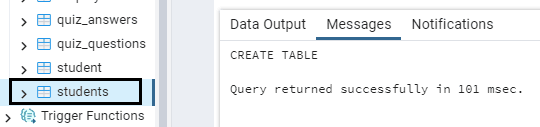
Notice in the image table has been created in pgadmin 4 under sampledb database table name is students
Step 5: Verify the Table
Expand your database → Schemas → Tables → students. You’ll see your columns along with the primary key, unique, and foreign key constraints applied.
From my experience, using SQL for table creation gives you flexibility, precision, and a strong understanding of how your database works. Once you’re comfortable with SQL, adding constraints becomes second nature.
Now, Before Continue the 2nd method. Checkout my latest blog post How to Reset PostgreSQL User Password Using psql & pgAdmin 4
Method 2: Using pgAdmin 4 GUI
If you prefer a visual approach rather than typing SQL Query syntax, pgAdmin 4’s GUI makes it easy to create tables and apply constraints like primary keys, foreign keys, and unique constraints without writing any code. From my experience, this method is great for beginners or anyone who wants a quick, intuitive way to build tables.
Step 1: Open pgAdmin 4
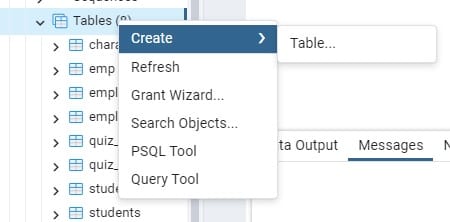
Launch pgAdmin 4 and connect to your database. In the left panel, expand your database and schema, then right-click on Tables → Create → Table. Just check the below image once you click the Table its popup a new window with General Tab contains Name Field ” Enter Your Table Name “.
Step 2: Enter Table Details
In the General tab, enter the table name, for example: customers. You can also add a comment describing the table if you want.
Step 3: Add Columns
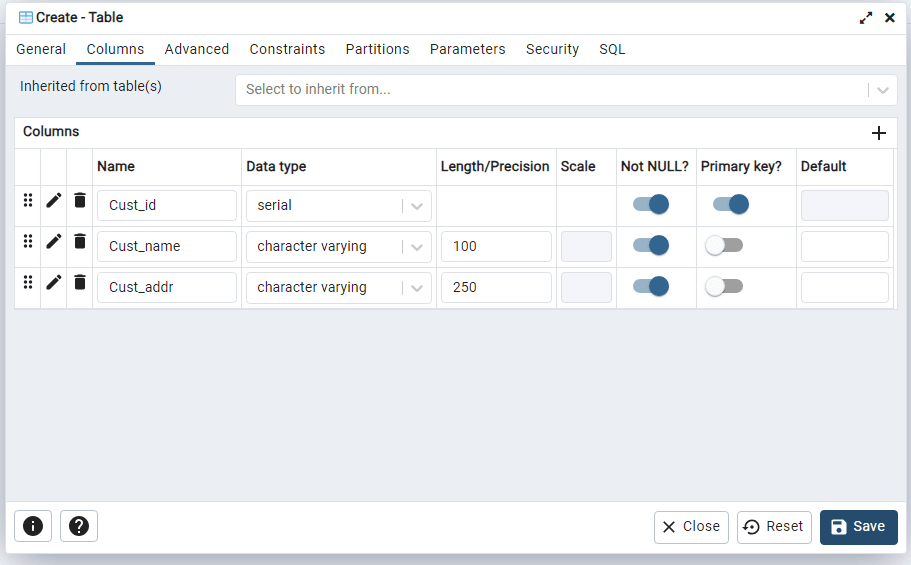
Switch to the Columns tab and add the following columns:
- Cust_id – Type: serial – Tick Primary Key
- Cust_name – Type: character varying – 100 – Tick Not Null
- Cust_addr– Type: character varying – 250 – Tick Not NULL
Step 5: Save the Table
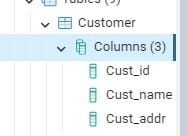
Once all columns and constraints are added, click Save. Your table will now appear under the Tables node in your schema. Notice the image customer table created with primary key
Youtube PostgreSQL Create Table With Primary Key pgAdmin
Free SQL AI Tools with Python AI Engineer Tutorial 2026
So far, we’ve learned how to create a table in PostgreSQL with a primary key using traditional SQL query syntax. Mastering these fundamentals is essential, but in 2026, AI is transforming the way developers work. Modern engineers are expected to combine strong SQL knowledge with AI-powered assistants and Python integration to stay ahead in the field.
This new way of coding is quickly becoming a must-have skill for developers. Still, never neglect the basics — core SQL syntax remains highly valued in interviews and real-world projects. By keeping your foundation strong while exploring AI-driven tools, you’ll be prepared for both traditional database tasks and advanced AI engineering roles. Free AI Coding Tools for Developers 2026 – Top 10+ Must Try
Common Errors and How to Fix Them
While working with PostgreSQL and pgAdmin 4, especially when Creating Table With Primary Key, you may run into some most common errors. Don’t worry — these are easy to fix once you know what to look for. From my experience, even experienced developers face these mistakes occasionally, so it’s good to be aware of them.
1. Duplicate Primary Key Values
Error: You try to insert a row with a primary key value that already exists.
Fix: Make sure the primary key column is unique. If using SERIAL, PostgreSQL automatically increments values, so avoid manually inserting duplicate IDs.
2. Missing NOT NULL on Primary Key
Error: You define a primary key column but allow NULL values.
Fix: A primary key column must always have a value. In pgAdmin 4, check the Not NULL box for the primary key column, or use PRIMARY KEY in your SQL query.
3. Syntax Errors in SQL
Error: pgAdmin shows errors like “syntax error at or near …” when running your CREATE TABLE query.
Fix: Review your SQL carefully. Common mistakes include missing commas, unmatched parentheses, or incorrect use of keywords. Reading the error message closely usually tells you the exact line causing the issue.
4. Trying to Create a Table That Already Exists
Error: PostgreSQL returns “relation already exists.”
Fix: Use CREATE TABLE IF NOT EXISTS table_name in SQL, or check the pgAdmin GUI to see if the table already exists before creating a new one.
From my experience, most errors when creating tables with primary keys in pgAdmin 4 come down to **typos, duplicate values, or misunderstanding constraints**. Double-check your column settings and constraints, and you’ll be able to create tables smoothly every time.
Conclusion
Creating tables with primary keys in PostgreSQL is a fundamental skill every developer and data professional should master. Whether you use traditional SQL queries or the pgAdmin 4 GUI, understanding how to define primary keys, foreign keys, and unique constraints ensures your data stays reliable, organized, and scalable.
In 2026, AI-powered tools and Python integration are transforming how we work with databases. Yet, the core principles of SQL remain invaluable. Mastering the basics not only helps in interviews but also builds a strong foundation for modern AI-driven workflows. From my experience, combining solid SQL knowledge with AI assistance gives you the edge to handle both traditional database tasks and advanced AI engineering projects confidently.
Keep practicing these techniques, experiment with AI SQL assistants, and always prioritize learning the fundamentals — they will serve you throughout your career.
F.A.Q: Primary Key & SERIAL in PostgreSQL
1. What is a primary key in PostgreSQL?
A primary key is a column (or a set of columns) that uniquely identifies each row in a table. It cannot have NULL values and ensures that each record is unique. Using a primary key helps maintain data integrity and is essential for relational database design.
2. What is SERIAL in PostgreSQL?
Its a special data type in PostgreSQL used to create **auto-incrementing integer columns**. It is often used for primary keys because it automatically generates a unique number for each new row, so you don’t have to manually assign IDs.
3. How does auto-increment work in PostgreSQL?
When you define a column as SERIAL, PostgreSQL creates a sequence behind the scenes. Each time you insert a new row, PostgreSQL automatically increments the value for that column. For example:
CREATE TABLE students (
    student_id SERIAL PRIMARY KEY,
    name VARCHAR(100) NOT NULL
);Code language: PHP (php)
Here, student_id automatically increments whenever you add a new student.
4. Can I have more than one auto-increment column?
Technically, yes, but usually only one column is set as the primary key with SERIAL. Other auto-increment columns can exist, but each should have its own sequence.
5. Can I manually insert a value into a SERIAL column?
Yes, you can manually insert a number. PostgreSQL will continue incrementing the sequence from the highest value. Be careful not to insert duplicate values if the column is a primary key.
6. Do I still need to learn SQL if AI tools handle auto-increment and primary keys?
Absolutely. AI tools can assist, but understanding core concepts like primary keys, SERIAL, and constraints is crucial for database design, debugging, and interviews. From my experience, strong fundamentals always give you an edge, even in AI-driven environments.