
How To Secure PostgreSQL Connection String In Python (pgAdmin 4)
📑 Table of Contents
Introduction
In this post, I’ll explain in a simple and clear way How To Secure PostgreSQL Connection String In Python (pgAdmin 4) in a ".env” file. This approach helps protect sensitive data like usernames and passwords from being exposed in your code. I’ll also cover why using a .env file is considered a best practice and the key advantages it offers in real-world applications. If you are interested Build AI That Converts English to PostgreSQL SQL Using Python (Step-by-Step Guide)
What is PostgreSQL Connection String?
A Python PostgreSQL connection string is simply the information your application needs to connect to a PostgreSQL database.
It includes details like:
- database server (host)
- database name
- username
- password
- port number
👉 In short, it tells your Python program how and where to connect to the database.
Advantages of Using .env File
1. Improved Security
Storing database credentials in a .env file keeps sensitive information like usernames and passwords out of your main code. This reduces the risk of exposing data when sharing or uploading your project online.
2. Easy Configuration Management
With a .env file, you can update database details without modifying your Python code. This makes it easier to manage different environments like development, testing, and production.
3. Safer Code Sharing
When you exclude the .env file from version control (using .gitignore), you can safely share your code on platforms like GitHub without exposing your database credentials.
4. Reusable Across Multiple Files
Once you store your database credentials in a .env file, you can reuse the same configuration across multiple Python files. This avoids duplication and keeps your project clean and consistent, especially in larger applications.
Using a .env file is a simple yet powerful way to make your Python applications more secure, flexible, reusable, and production-ready.
Disadvantages of Using .env File
1. Not Safe if Exposed
A .env file is secure only if it remains private. If you accidentally upload it to GitHub or share it publicly, your database credentials can be exposed.
👉 Unlike encrypted storage, .env files store data in plain text.
Simple Explanation
Think of a .env file like a notebook where you write your passwords.
- ✔ Safe if you keep it private
- ❌ Risky if someone else gets access
🔒 How to Avoid This Problem
- Always add
.envto.gitignore
(Adding.envto.gitignoreensures that sensitive configuration files are not uploaded to version control systems like GitHub, keeping credentials secure.) - Never share it publicly
- Use environment variables in production servers
- Rotate passwords if exposed
Let’s Start The coding Part. In this example my project located in “C:\wamp64\www\Algo” and inside the Algo folder i created “.env” and “Secure-postgre-conn.py”
first open your .env file
Project Setup
Secure Python PostgreSQL connection (Best Practice)
✅ Step 1: Install Required Libraries
pip install psycopg2-binary python-dotenv
psycopg2→ It Connects Python PostgreSQL connectionpython-dotenv→ Loads environment variables from a.envfile
Add Credentials in .env File
In your project folder, create a file named:
.env
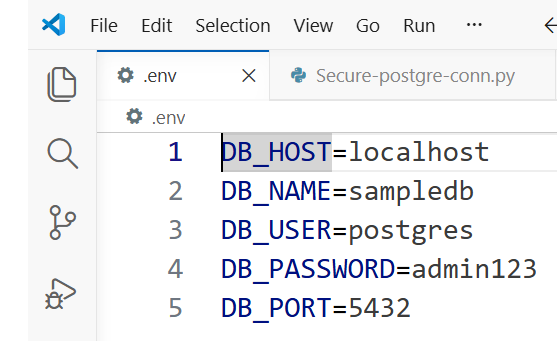
Add your database credentials:
DB_HOST=localhost
DB_NAME=mydatabase
DB_USER=myuser
DB_PASSWORD=mypassword
DB_PORT=5432
👉 This file keeps sensitive data outside your code. Below is my own connection string properties image, just add according to your connection string properties
and Here is the complete tutorial How to Reset PostgreSQL User Password in pgAdmin 4 & psql (Step-by-Step Guide)
Now, Now let’s see how to secure Python PostgreSQL connection with a practical example “Secure-postgre-conn.py”
Python Code Example for PostgreSQL Connection in Python
import os
import psycopg2
from dotenv import load_dotenv

# Load environment variables
load_dotenv()

def get_connection():
    try:
        connection = psycopg2.connect(
            host=os.getenv("DB_HOST"),
            database=os.getenv("DB_NAME"),
            user=os.getenv("DB_USER"),
            password=os.getenv("DB_PASSWORD"),
            port=os.getenv("DB_PORT"),
        )
        print("✅ Connection successful")
        return connection

    except Exception as e:
        print("❌ Connection failed:", e)
        return None

# Example usage
conn = get_connection()

if conn:
    cursor = conn.cursor()
    cursor.execute("SELECT version();")
    print(cursor.fetchone())
    cursor.close()
    conn.close()
Output of my code
PS C:\wamp64\www\Algo> python secure-postgre-conn.py
✅ Connection successful
(‘PostgreSQL 16.0, compiled by Visual C++ build 1935, 64-bit’,)
PS C:\wamp64\www\Algo>
FAQ (Interview Questions)
1. How do I connect Python PostgreSQL connection?
You can use the psycopg2 library and provide database details like name, user, password, and host.
2. What is psycopg2?
It is a Python library used to connect and work with PostgreSQL databases.
3. Why should we not hardcode database credentials in Python?
If you write your database username and password directly in your code, anyone who sees your code can also see those details. This is risky, especially if you upload your project online. Using a .env file keeps your credentials separate and safer.
4. How do you securely connect to PostgreSQL in Python?
The simple way is to store your database details in a .env file and then read them in your Python code using os.getenv(). After that, you can use psycopg2 to connect to the database without exposing your password in the code.
5. What is a .env file and why is it used?
A .env file is just a file where you store important values like database username, password, or API keys. It helps you keep your code clean and makes it easier to manage settings without changing your code again and again.
6. Can we have multiple .env files in one project?
Yes, you can have multiple .env files in one project. This is usually done for different environments like development and production. You can load the required .env file in your Python code based on your setup.
Conclusion
By following these steps, you can maintain a Secure PostgreSQL Connection String In Python without exposing passwords, using a .env file.