
5 Easy Steps to Quickly Create a Table in PostgreSQL Using Python with pgAdmin 4
Table of Contents
Introduction: How to Create a Table in PostgreSQL Using Python
Even though AI tools today can generate code in seconds like a Build AI That Converts English To PostGREsql sql using python , I still believe every developer should understand the basics of databases. From my experience, learning how to create a table in PostgreSQL using Python really helped me understand how data is structured. It also made debugging much easier.
When I worked with Python PostgreSQL tutorials and psycopg2 examples, I realized automation is powerful — but only when you know what’s happening behind the scenes.
If you’re a beginner or even an experienced developer looking to manage data efficiently, learning how to create a table in PostgreSQL using Python is a crucial skill. PostgreSQL is a powerful, open-source relational database, and combining it with Python allows you to automate database tasks, handle data programmatically, and integrate databases seamlessly into your applications.
In this Python PostgreSQL tutorial, we’ll walk you through everything—from setting up your Python environment with psycopg2 to executing your first CREATE TABLE command in PostgreSQL. By the end of this guide, you’ll not only be comfortable writing SQL queries in Python but also understand best practices to structure your tables for scalability and performance.
Whether you’re building a small project, working on a web application, or just learning database automation, this psycopg2 create table example will give you a strong foundation to start using PostgreSQL with Python confidently.
🔥 Quick Answer
You can create a table in PostgreSQL using Python by connecting to the database using psycopg2, writing a CREATE TABLE query, and executing it with a cursor object. This method allows you to automate table creation and manage your database directly from Python.
Create Table in PostgreSQL Using Python Example
I know from my own experience that the first time you try to create a table in PostgreSQL using Python, it can feel a bit overwhelming. Don’t worry — I’ll break it down into simple, actionable steps that anyone can follow. In this example, we’ll use pgAdmin 4 to manage the database visually while Python handles the table creation in code. More about PostgreSQL: Documentation
Install psycopg2 and Set Up Python Environment
The first thing I always do is make sure my Python environment is ready. The psycopg2 library allows Python to communicate with PostgreSQL, and installing it is quite simple.
I use Visual Studio Code for coding. At the bottom of the editor, you’ll find the Terminal option. Open it, paste the command below, and make sure you’re in the correct directory before running it.
pip install psycopg2-binary
What is psycopg2?
psycopg2 is a Python library — basically a collection of pre-written code — that allows your Python programs to communicate with a PostgreSQL database. PostgreSQL understands SQL, while Python uses its own syntax, and psycopg2 acts as the bridge between the two.
Without it, Python wouldn’t know how to send queries to PostgreSQL or retrieve data from it.
Think of it like this: imagine you want to ask a friend in another country for information, but they don’t speak your language. In that case, psycopg2 works like an interpreter, making sure both sides understand each other clearly.
Why Do We Use psycopg2?
Connect Python to PostgreSQL
- Connect to the database — It allows you to establish a connection to PostgreSQL directly from Python.
- Execute SQL commands — You can create tables, insert data, update records, or run complex queries.
- Fetch results — It lets you retrieve query results and use them as Python objects.
- Transactions & data safety — It supports commits and rollbacks, helping maintain data consistency and prevent data loss.
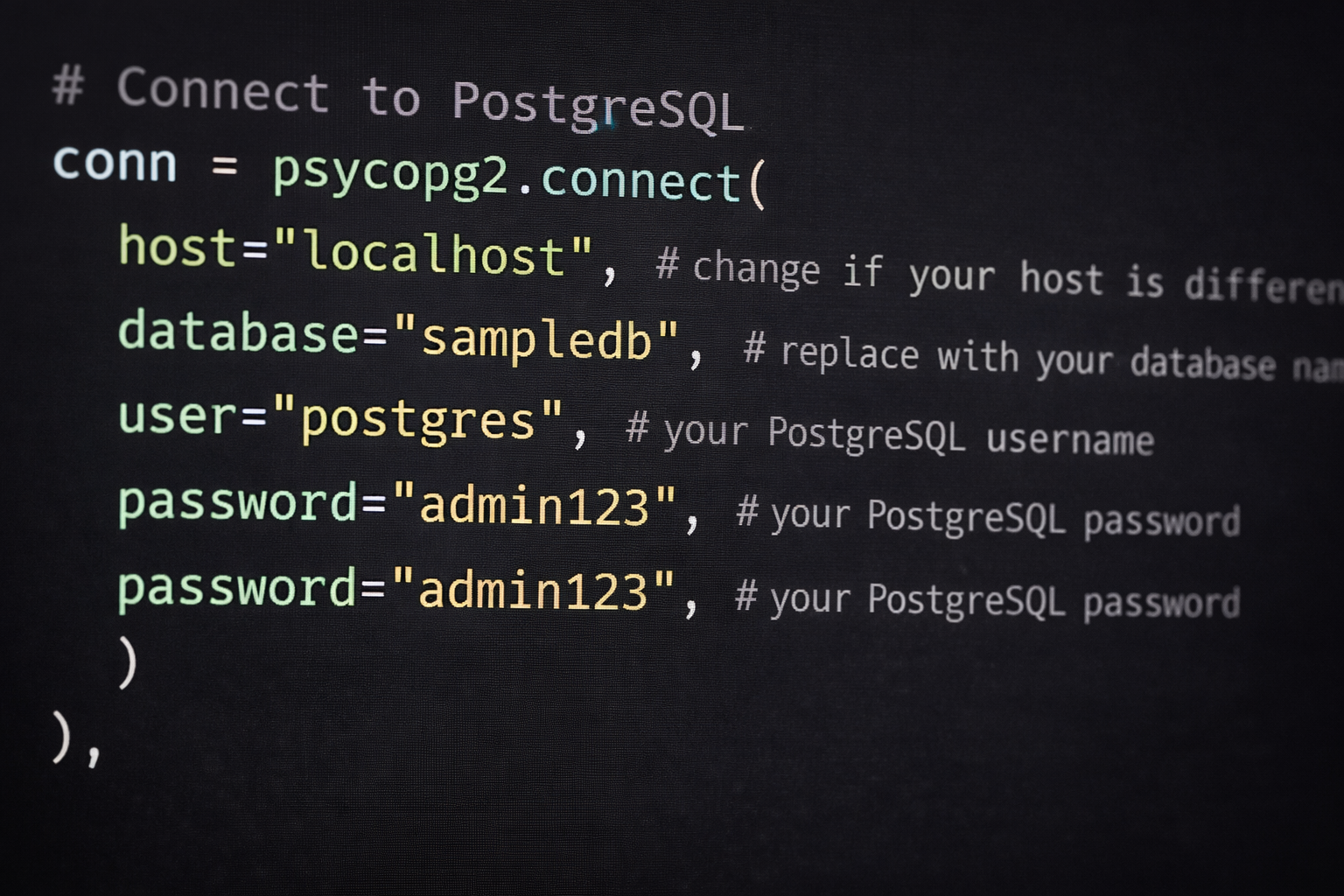
Note: Always the best practice to store your database connections in environment file (.env). Here, is the complete tutorial How To Secure PostgreSQL Connection String In Python (pgAdmin 4)
Step by step create a table in PostgreSQL using Python Complete Code
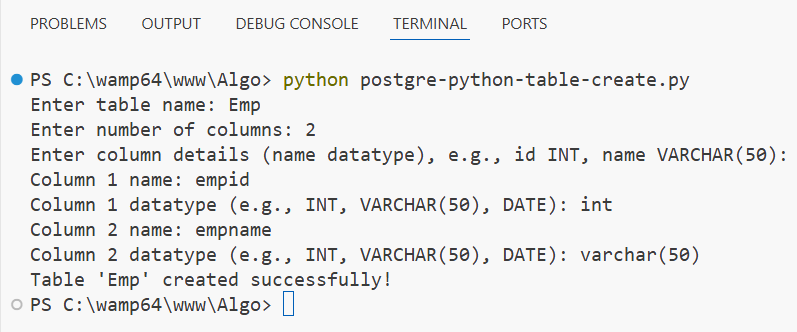
In this project, I installed the psycopg2 package to connect Python with PostgreSQL. I used a simple function to take user input like table name and column details with respective datatypes. Based on that input, I built a SQL query to create a table automatically. This approach helped me avoid writing SQL manually and made the process faster and easier.
import psycopg2
def create_table():
    # Connect to PostgreSQL
    conn = psycopg2.connect(
        host="localhost",
        database="sampledb",  # replace with your database name
        user="postgres",  # your PostgreSQL username
        password="admin123",  # your PostgreSQL password
    )
    cursor = conn.cursor()
    table_name = input("Enter table name: ")
    while True:
        try:
            n = int(input("Enter number of columns: "))
            if n <= 0:
                print("Number of columns must be greater than 0")
                continue
            break
        except ValueError:
            print("Please enter a valid integer.")
    columns = []
    print("Enter column details (name datatype), e.g., id INT, name VARCHAR(50):")
    for i in range(n):
        col_name = input(f"Column {i+1} name: ")
        col_type = input(f"Column {i+1} datatype (e.g., INT, VARCHAR(50), DATE): ")
        columns.append(f"{col_name} {col_type}")

    columns_str = ", ".join(columns)
    create_table_query = f"CREATE TABLE {table_name} ({columns_str});"

    try:
        cursor.execute(create_table_query)
        conn.commit()
        print(f"Table '{table_name}' created successfully!")
    except Exception as e:
        print(f"Error creating table: {e}")
        conn.rollback()
    cursor.close()
    conn.close()

if __name__ == "__main__":
    create_table()
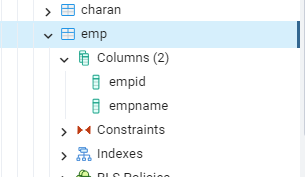
After running the code, I was able to create a table named emp with two columns, empid and empname, by providing the appropriate datatypes while entering the column details.
also, Image of the postgresql database there is a emp table with 2 columns..
Step-by-step code explanation
1. Import library
import psycopg2
This imports the library that lets Python connect to PostgreSQL.
2. Create function
def create_table():
All the logic is written inside this function.
3 Connect to database
conn = psycopg2.connect(...)
cursor = conn.cursor()
- Connects Python to your PostgreSQL database
cursoris used to run SQL commands
4. Get table name
table_name = input("Enter table name: ")User enters the name of the table they want to create.
5. Get number of columns
n = int(input("Enter number of columns: "))- Asks how many columns the table should have
- Includes validation to make sure it’s a valid number
6. Get column details
columns = []
for i in range(n):
- User enters column name and datatype (like
id INT,name VARCHAR(50)) - These are stored in a list
Execute CREATE TABLE Command
7. Build SQL query
create_table_query = f"CREATE TABLE {table_name} ({columns_str});"- Combines all inputs into a SQL
CREATE TABLEcommand
Commit and Close Connection
8. Execute query
cursor.execute(create_table_query)
conn.commit()
- Runs the query in PostgreSQL
- Saves the changes
9. Handle errors
except Exception as e:
- If something goes wrong, it shows the error
- Rolls back changes to keep data safe
10. Close connection
cursor.close()
conn.close()
Closes database connection properly.
11. Run the program
if __name__ == "__main__":
    create_table()
Beginners Common Mistakes & Tips
When I first started working with PostgreSQL and Python, I made a few simple mistakes that caused errors. Here are some quick tips to help you avoid them:
- Don’t forget to use
commit()— without it, your table won’t be saved - Always close the connection using
cursor.close()andconn.close() - Avoid hardcoding credentials — use a
.envfile for security - Make sure your SQL syntax is correct before executing
- Validate user input to prevent errors
💡 Pro Tip
If something doesn’t work, don’t panic — most issues come from small mistakes like wrong database names, incorrect passwords, or missing commits.
Best Practices for Table Creation
Creating tables is easy, but designing them properly makes a big difference in performance and scalability. Here are some best practices I personally follow:
- Use meaningful table and column names
Choose clear names likeusers,orders, orstudent_dataso your database is easy to understand. - Always define a primary key
Every table should have a unique identifier (likeid SERIAL PRIMARY KEY) to manage records efficiently. - Choose correct data types
Use appropriate types likeINT,VARCHAR,DATEto save space and improve performance. - Avoid unnecessary columns
Keep your table structure simple and only include what is required. - Use constraints when needed
AddNOT NULL,UNIQUE, orDEFAULTvalues to maintain data integrity. - Normalize your data
Avoid duplicate data by splitting it into related tables when needed. - Don’t hardcode sensitive data
Store database credentials securely using environment variables (.env).
💡 Pro Tip
A well-designed table saves you from future headaches. Spend a little extra time planning your structure—it will make your queries faster and your application more scalable.
Sample Table Structure for postgresql syntax
CREATE TABLE students (
    id SERIAL PRIMARY KEY,
    name VARCHAR(50),
    age INT,
    email VARCHAR(100)
);
Frequently Asked Questions (FAQ)
1. Can I create a table in PostgreSQL using Python?
Yes, you can create tables in PostgreSQL using Python with the help of the psycopg2 library. It allows you to execute SQL commands directly from your Python code.
2. Do I need pgAdmin 4 to create a table in PostgreSQL using Python?
No, pgAdmin 4 is not required. You can create tables using Python alone, but pgAdmin helps you visually manage and verify your database.
3. What is psycopg2 Create Table Step by Step used for?
psycopg2 is used to connect Python with PostgreSQL. It lets you run SQL queries, create tables, insert data, and fetch results.
4. Why is commit() important?
The commit() function saves your changes to the database. Without it, your table or data will not be permanently stored.
5. How do I avoid errors while creating tables?
You can avoid errors by:
- Checking your SQL syntax
- Using correct database credentials
- Validating user input
- Handling exceptions in your code
6. Is it safe to store database credentials in code?
No, it’s not recommended. Always use environment variables (.env file) to store sensitive information securely.
7. Can beginners learn PostgreSQL with Python easily?
Yes! With simple examples like this, beginners can quickly understand how Python interacts with databases and start building real projects.
Conclusion: Step-by-Step Guide to Create Table in PostgreSQL Using Python
In this step-by-step guide to create a table in PostgreSQL using Python, I explained how I personally connected Python to PostgreSQL and built a table using simple user input. When I first tried this, I made a few mistakes—like forgetting to commit changes and using the wrong database details—but those small errors helped me understand how things actually work.
From my experience, once you start working with psycopg2, everything becomes much clearer. You’re not just writing SQL anymore—you’re controlling your database directly from Python, which is really powerful.
If you’re just starting out, don’t worry if you run into errors. That’s part of the learning process. Try small examples, fix issues step by step, and you’ll quickly get comfortable creating tables in PostgreSQL using Python.
💡 Final Tip
I always suggest understanding the basics first. Tools and automation are helpful, but knowing what’s happening behind the scenes will make you a much better developer.