3 Most Wanted AI Jobs for Python SQL Excel Developers (2026)
It’s 2026, and technology is evolving faster than ever. From what I’ve seen and experienced, one thing is clear—AI is no longer the future, it’s the present. Every company, whether small or large, is trying to integrate AI into their systems. And this shift is creating a huge opportunity for developers like us.
I’ve personally noticed that having a degree or even years of experience in IT is no longer enough. What truly makes the difference now is how well you can combine your existing skills with AI tools. If you already know Python, SQL, or even Excel, you are in a powerful position—you just need to level it up with AI.
In this post, based on my understanding and experience, I’ll walk you through the 3 most wanted AI jobs for Python, SQL, and Excel developers in 2026, and how you can align your goals to land a high-paying job role.
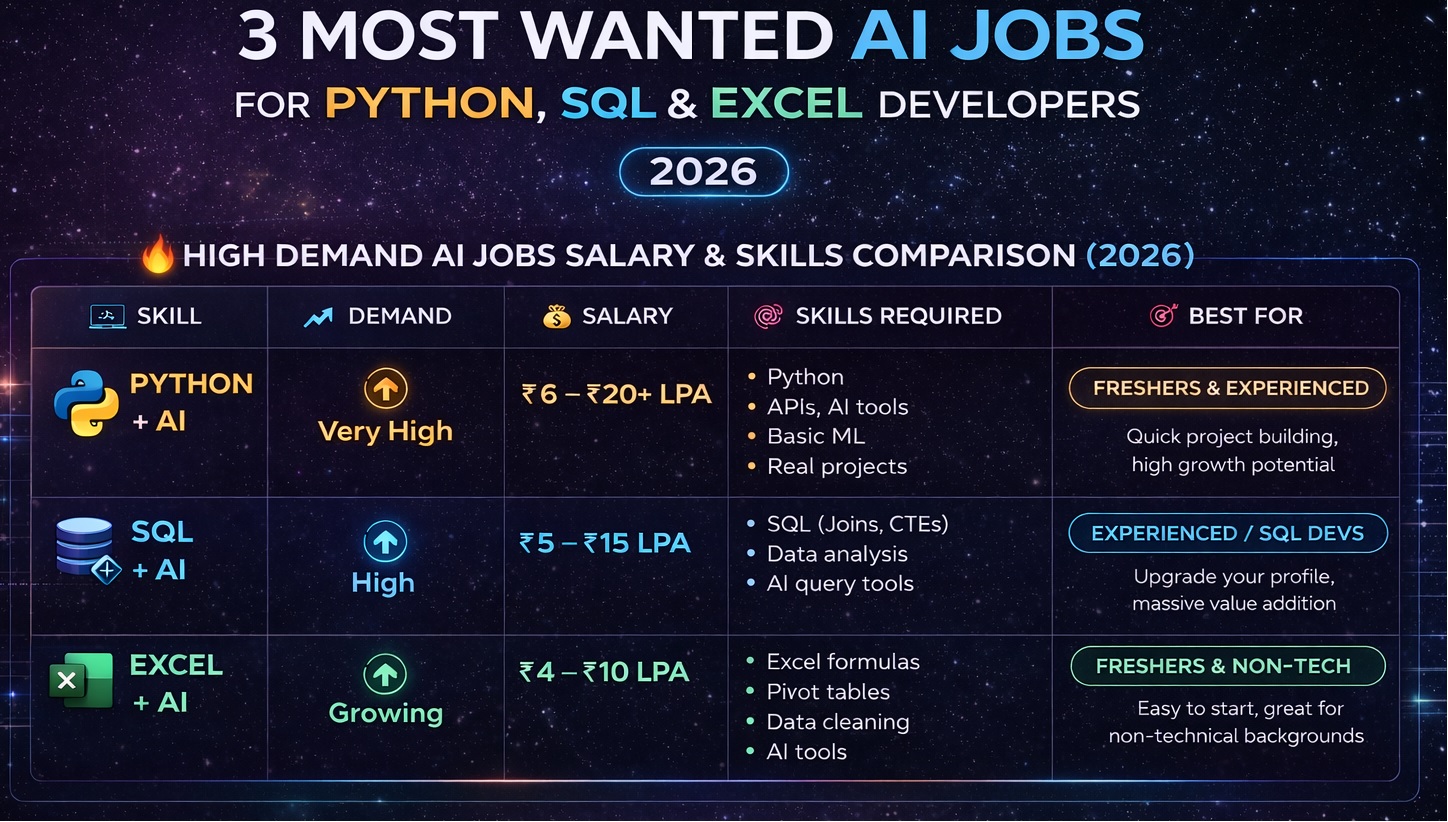
🔥 AI jobs for Python SQL Excel developers : Salary & Skills Comparison (2026)
| 💻 Skill | 📈 Demand | 💰 Salary | 🧠 Skills Required | 🎯 Best For |
|---|---|---|---|---|
| Python + AI | Very High | ₹6 – ₹20+ LPA | Python, APIs, AI tools, basic ML, real projects | Freshers & Experienced |
| SQL + AI | High | ₹5 – ₹15 LPA | SQL (Joins, CTEs), Data analysis, AI query tools | Experienced / SQL Devs |
| Excel + AI | Growing | ₹4 – ₹10 LPA | Excel formulas, Pivot tables, Data cleaning, AI tools | Freshers & Non-tech |
“Based on my experience, Python + AI offers the highest growth, but SQL + AI is the most underrated skill in today’s market.”
From my experience, this applies to both freshers and experienced professionals, but the approach is different.
If you’re a fresher, Python + AI or Excel + AI is a great starting point because you can quickly build projects and showcase your skills. You don’t need years of experience—just practical knowledge and consistency.
If you already have experience, especially in SQL or backend development, adding AI to your skillset can significantly increase your value. Instead of switching careers, you’re simply upgrading your profile.
In fact, I’ve seen situations where a developer with just 2 years of experience, but strong AI skills, earns more than a senior developer who hasn’t adapted yet. That’s how big the gap is becoming.
So instead of changing your career, the smart move is to upgrade it. Mix AI with your current skills and stay relevant.
💡 My Experience with AI (Real Shift in Mindset)
Initially, I had the same fear that many developers have today. I thought, “What if AI replaces coding jobs?” I was honestly confused and a bit worried about the future.
But things changed when I started experimenting with AI tools myself.
After spending some time learning and building small projects, I realized something important—AI is not here to replace programmers. It’s actually here to assist and speed up our work. Once I understood how to use it properly, my entire perspective changed.
Instead of writing everything from scratch, I started using AI to handle repetitive tasks, generate ideas, and even build working solutions faster than before. It didn’t reduce my value—it actually increased my productivity.
For example, I built a project where I created a Python + SQL AI chatbot like chatGPT that can fetch data from a database just by using normal English—without writing a single SQL query.
👉 You can check the full guide here: Build AI That Converts English To PostgreSQL sql using python
In another project, I created a completely dynamic MCQ quiz generator using Excel and Python with an OpenAI API key. The system generates questions automatically without writing full code manually.
These small projects made me realize that the real advantage is not just coding anymore—it’s about how well you combine coding with AI tools.
Let’s discuss 3 Top AI jobs for developers in 2026 Roadmap for a Super Career
Python Developer → AI Engineer Roadmap (Complete Guide)
Fix Your Foundations (Very Important)
Before jumping into AI concepts, your python basics must be strong.
✅ Must Know:
- Python (you already know 👍 but focus on:)
- OOP
- File handling
- APIs (
requests,FastAPI)
- Data handling:
NumPyPandas
👉 Goal: You should be comfortable working with real-world datasets. In real-time projects, data is often messy, with missing values, incorrect formats, duplicate rows, and mixed data types. Your role is to clean, transform, and analyze the data to make it usable for data analysis and AI models.
1. Data Loading & Exploration (The First Step)
Before building any model, you need to understand your data.
📌 Loading Data in Python : Most datasets come in formats like CSV, Excel, or APIs.
- CSV files →
pd.read_csv(), It is used to load data from a CSV file into a DataFrame so you can work with it in Python. - Excel files →
pd.read_excel(), It is used to load data from an Excel file into a DataFrame so you can easily analyze it in Python. - APIs → JSON data, APIs provide data in JSON format, which can be easily loaded into Python and converted into a structured dataset for analysis.
📌 Exploring the Dataset : Once data is loaded, your first job is to inspect it:
- View top rows →
df.head(),is used to display the first few rows of your dataset. By default, it shows the first 5 rows, giving you a quick preview of how your data looks. - Check structure →
df.info(), It shows a quick summary of your dataset, including column names, data types, and missing values. - Get statistics →
df.describe(), t gives a quick statistical summary of your data, like average, minimum, maximum, and spread of values.
🎯 Your Goal
At this stage, you should clearly understand:
- What columns are present
- What type of data each column contains
- Whether there are missing values
🧹 2. Data Cleaning (The Most Important Step)
In real-world projects, data is often messy, and if you don’t clean it properly, it can lead to wrong results.
🔥 Common Problems:
- Missing values mean some data is not filled in, which can affect analysis
- Duplicate rows are repeated entries that can distort results.
- Incorrect data types happen when values are stored in the wrong format, like numbers saved as text.
- Inconsistent column names occur when naming is not uniform, making the data harder to work with.
📌 Key Skills You Need
✅ Handling Missing Values
You should know how to:
- Identifying missing data means finding empty or null values in your dataset. For example, using
df.isnull().sum()shows how many missing values are in each column. - Fill it or remove it depending on the situation
✅ Removing Duplicates
Duplicate records can distort your analysis, so cleaning them is essential.
✅ Fixing Data Types
Sometimes dates, numbers, or categories are stored incorrectly. Converting them to the correct format is crucial.
✅ Renaming Columns
Clear and meaningful column names improve readability and usability.
👉 Important: Data cleaning alone can take 60–70% of project time in real jobs.
🔄 3. Data Transformation
After cleaning, raw data needs to be transformed into a useful format.
📌 What You’ll Do:
- Create new columns, It means adding a new column to your dataset by using or combining existing data to generate new values.
- Filter important data means keeping only the data that is useful and removing the rest.
- Group and aggregate values means combining data based on categories and calculating totals, averages, or counts.
📌 Examples:
- Calculating totals
- Filtering high-value records
- Grouping data by categories
👉 This step is heavily used in AI, analytics, and SQL-based roles.
📈 4. Data Analysis (Think Like a Data Analyst)
Now comes the most interesting part — finding insights.
You should be able to answer:
- What trends exist in the data?
- Are there any patterns?
- What useful insights can be extracted?
📌 Example Tasks:
- Calculate averages
- Find maximum or minimum values
- Compare performance across categories
📊 Visualization Tools:
- Matplotlib is a tool in Python that helps you draw charts and graphs from your data. Here is the implementation Matplotlib in real project How to Build Excel Dashboard with Python AI (No Manual Work)
- Seaborn is a Python tool used to create nice-looking and easy-to-understand charts.
👉 Visualization helps turn raw data into clear insights.
🧠 5. Feature AI Engineering (Where You Become Valuable)
This is one of the most important skills in AI.
📌 What is Feature AI Engineering?
It means creating better input data for machine learning models.
📌 Examples:
- Converting text into numerical format
- Extracting month or day from dates
- Encoding categorical data
👉 Better features = better model performance.
⚖️ 6. Handling Outliers
Outliers are extreme values that can break your model.
📌 Why They Matter:
- They distort averages
- They reduce model accuracy
📌 What You Should Do:
- Identify unusual values
- Decide whether to remove or adjust them
🧩 7. Working with Different Data Types
In real-world projects, data comes in different formats.
📌 Types of Data:
- Structured Data → Tables (CSV, SQL)
- Semi-structured Data → JSON (APIs)
- Unstructured Data → Text (used in AI models)
👉 A good developer knows how to handle all three.
🗄️ 8. SQL + Dataset Skills (Highly Important)
In real companies, data is stored in databases, not files.
📌 You Should Know:
- Writing queries
- Joining tables
- Aggregating results
👉 Combining SQL + Python is one of the most in-demand skills in 2026.
🚀 9. End-to-End Workflow (What Companies Expect)
In real projects, you’ll follow this process:
- Collect data (CSV, API, Database)
- Clean the data
- Transform it
- Analyze it
- Build a model
- Deploy the solution
👉 This is the complete lifecycle of a data/AI project.
🎯 Real-World Example
Let’s say you’re working with an e-commerce dataset.
You might:
- Remove missing values
- Calculate total sales
- Identify top-selling products
- Predict future sales trends
👉 This is exactly how real business problems are solved.
Conclusion:
Working with data is a step-by-step process. First, you load and understand the data. Then you clean it because real data is usually messy. After that, you transform and organize it so it becomes useful. Next, you analyze the data to find patterns and insights. You may also create better features and handle unusual values to improve results.
In real jobs, most of the time is spent on cleaning and preparing data. Once the data is ready, everything else becomes easier.
If you learn these steps well, you can solve real-world problems, make better decisions, and build powerful AI or data projects.
In simple words:
Good data → Good analysis → Good results 🚀
SQL + AI Career Path: What I Learned, What Actually Matters, and How You Can Start
(Top AI Jobs for Developers in 2026 | AI Engineer Roadmap)
When I first started working with data, I thought SQL alone was enough. I could write queries, join tables, and pull reports. But over time, I realized something important — just getting data is not enough anymore. Companies want insights, predictions, and smarter decisions. That’s where AI comes in.
In this blog, I’m going to share what I’ve learned from my own experience about combining SQL with AI, what concepts really matter, and how you can build a strong career in this field.
Why SQL + AI Is One of the Top AI Jobs for Developers in 2026
From what I’ve seen in the industry, SQL + AI is becoming one of the top AI jobs for developers in 2026. The reason is simple — every company has data, but very few people know how to actually use it smartly.
I’ve worked on small projects and practice datasets where:
- SQL helped me extract the right data
- AI helped me understand patterns faster
For example, I once analyzed a sales dataset. Using SQL, I calculated total revenue and customer behavior. Then, with AI tools, I quickly identified which customers were likely to return. That kind of insight is what companies are really paying for.
What Actually Matters in This Career Path
From my experience, you don’t need to learn everything. You just need to focus on the right things.
1. Strong SQL Foundation
I always tell beginners — don’t rush this part.
Focus on:
- Joins (very important in real projects)
- GROUP BY and aggregations
- CTEs (for clean and readable queries)
- Window functions (this changed how I work completely)
In my daily practice, I use SQL not just to fetch data, but to think through problems.
2. Data Thinking (This Is Where Most People Fail)
This is something I learned the hard way. Data thinking means understanding what the data is actually telling you, not just writing queries. Many people learn SQL and can write queries, but they stop there. They just pull numbers and don’t ask questions. That’s the mistake.
Writing queries is one thing. Understanding what the data is saying is another.
I started improving when I began asking questions like:
- Why is this number increasing?
- Which category is underperforming?
- What pattern do I see over time?
That mindset shift made a big difference.
3. AI Tools (Your Productivity Booster)
Now coming to the AI part. I use AI tools almost every day. They don’t replace my skills — instead, they help me work faster and smarter.
With AI, I can:
- Generate SQL queries faster → AI can quickly write the queries I need instead of doing it manually.
- Debug mistakes → AI helps me find and fix errors in my queries or data.
- Summarize data insights → AI can explain large datasets in a simple, easy-to-understand way.
- Get suggestions for analysis → AI gives ideas on what patterns or trends I should look for.
This is why this path fits perfectly into the AI Engineer Roadmap — you are not just coding, you are building intelligence around data.
How SQL Fits Into the AI Engineer Roadmap
When I first heard about the AI Engineer Roadmap, I thought it was only about machine learning and Python. But after working with data, I realized SQL plays a huge role.
Here’s how I see it:
- SQL → Extract and prepare data
- Data Analysis → Understand patterns
- AI/ML → Build predictions
- AI Tools → Improve speed and efficiency
Without SQL, the entire pipeline breaks.
Real Example From My Experience check out my youtube video tutorials on SQL Server with python concepts real time examples
Let me explain this in a simple way.
I worked on a dataset where I had:
- Customer details
- Order history
Step 1: I used SQL to join tables and calculate total spending
Step 2: I grouped customers based on spending behavior
Step 3: I used AI tools to identify high-value customers
That simple workflow gave meaningful insights — something businesses actually use.
Mistakes I Made (And You Should Avoid)
I think this is important to share honestly.
- I ignored SQL depth in the beginning
- I focused too much on tools, not enough on concepts
- I didn’t practice real datasets
Once I fixed these, everything started making more sense.
Simple AI Engineer Roadmap I Recommend (From My Experience)
If you are starting today, this is what I would suggest:
Step 1: Learn SQL basics (Joins, GROUP BY)
Step 2: Practice with real-world datasets
Step 3: Learn advanced SQL (CTEs, window functions)
Step 4: Start using AI tools alongside SQL
Step 5: Learn basic machine learning concepts
Follow this consistently, and you will naturally move into one of the top AI jobs for developers in 2026.
Conclusion: Why SQL + AI Is a Game-Changer
From my experience, SQL + AI is more than just a skill — it’s a career booster. You don’t need to be a hardcore programmer to succeed. What matters is:
- Understand your data – Know what the numbers are really saying.
- Ask the right questions – Focus on insights, not just reports.
- Use AI tools smartly – Let AI speed up your work and guide analysis.
In simple words: I use SQL to pull the data, and I use AI to understand the story behind it.
Once I mastered this combination, my confidence, productivity, and career opportunities grew significantly.
If you want to thrive in top AI jobs for developers in 2026 and follow a clear AI engineer roadmap, learning SQL + AI is one of the smartest steps you can take today.
Excel + AI Career Path: A Growing Opportunity
Excel has been a core tool for data work for decades. From my experience, combining Excel with AI takes it to the next level. With AI integration, Excel is no longer just a spreadsheet — it becomes a smart tool that helps you analyze data, find trends, and even make predictions.
This combination is especially valuable for freshers and non-technical professionals because it allows you to start a data career without heavy coding skills, while still delivering meaningful insights for businesses.
Career Overview
- Demand: Growing 📈 — more companies are looking for people who can analyze data efficiently using Excel and AI.
- Salary: ₹4 – ₹10 LPA — excellent starting point for freshers and career switchers.
- Skills Needed:
- Excel formulas
- Pivot tables
- Data cleaning
- AI tools for insights and automation
- Ideal for: Freshers, non-tech professionals, business analysts, and anyone who wants to start in the data field.
Key Skills Explained in Simple Words
- Excel Formulas → Help you calculate totals, averages, percentages, and other important numbers automatically, saving time and reducing errors.
- Pivot Tables → Let you summarize large datasets, find patterns, and compare results quickly without writing complex formulas.
- Data Cleaning → Fix errors, remove duplicates, and standardize your data so that analysis is accurate and reliable.
- AI Tools → Assist in spotting trends, predicting future outcomes, generating reports, and even suggesting new ways to analyze your data.
Why Excel + AI Is a Smart Career Choice
From my experience, Excel is more than just a basic spreadsheet tool. When combined with AI:
- You can automate repetitive tasks that would normally take hours.
- You can analyze large datasets without knowing programming languages like Python or SQL.
- You can deliver insights immediately, helping businesses make faster, smarter decisions.
Example from my work:
I once used Excel to analyze sales data for a small company. Using formulas and pivot tables, I grouped top-selling products. Then, with AI tools, I predicted which products were likely to sell more in the next month. This simple workflow provided actionable insights without writing a single line of code.
Conclusion
From my experience, Excel + AI is a powerful combination for anyone starting a career in data, especially freshers or non-technical professionals. You don’t need to be a programmer — mastering formulas, pivot tables, and AI tools is enough to create real impact.
In simple words: Excel helps you organize and calculate data, while AI helps you uncover insights and understand the story behind the numbers. Together, they make you highly valuable in today’s data-driven workplace.
If you focus on these skills now, you’re positioning yourself for AI jobs for Python SQL Excel developers high-growth opportunities and practical roles in 2026 and beyond.